Loading
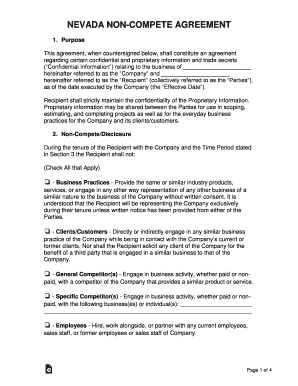
Get Nv Non-compete Agreement 2016-2026
How it works
-

Open form follow the instructions
-

Easily sign the form with your finger
-

Send filled & signed form or save
How to fill out the NV Non-Compete Agreement online
The NV Non-Compete Agreement is designed to protect the confidential information and trade secrets of a company while outlining the restrictions placed on the recipient. This guide will provide clear, step-by-step instructions on how to complete the form online effectively.
Follow the steps to complete your NV Non-Compete Agreement.
- Click ‘Get Form’ button to access the NV Non-Compete Agreement and open it in your preferred online editor.
- In the first section, input the name of the company in the designated space where it states 'the Company' and provide your name where it indicates 'the Recipient'. This will clarify the parties involved in the agreement.
- Review the second section regarding non-compete/disclosure. Check the boxes that apply to you. Each checkbox details specific activities that you agree to refrain from, such as representing any similar business or soliciting clients.
- In the third section, define the 'Time Period' by selecting either the effective date of the agreement or the termination of your employment with the company. Ensure you check only one option.
- Fill out the 'Purchase Option' section. Choose whether the company allows a way for you to void the agreement by making a payment and specify the amount if applicable.
- Indicate the jurisdiction that applies to the agreement in section five. This often refers to the location where legal matters regarding the agreement will be resolved.
- Review the sections about 'Confidential Information', 'Permitted Disclosure', and 'Confidentiality'. Familiarize yourself with what constitutes confidential information and your obligations regarding its protection.
- In the final sections, acknowledge the importance of maintaining confidentiality and returning any company materials upon the termination of the agreement. Fill in the signature fields for both you and the company representative.
- Once all fields are completed and verified, save your changes to the document. You may then choose to download, print, or share the form as required.
Complete your non-compete agreements online today to ensure the protection of confidential information.
But what's the penalty? Well, pursuant to the Labor Code Section 2699(e), a California employer may be fined $100 for each aggrieved employee per pay period for such a violation.
Industry-leading security and compliance
US Legal Forms protects your data by complying with industry-specific security standards.
-
In businnes since 199725+ years providing professional legal documents.
-
Accredited businessGuarantees that a business meets BBB accreditation standards in the US and Canada.
-
Secured by BraintreeValidated Level 1 PCI DSS compliant payment gateway that accepts most major credit and debit card brands from across the globe.