Loading
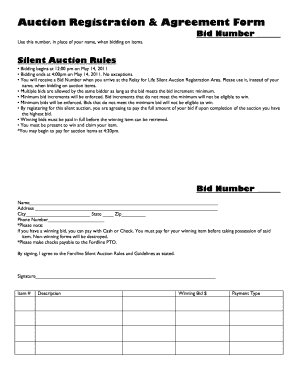
Get Auction Registration & Agreement 2011-2025
How it works
-

Open form follow the instructions
-

Easily sign the form with your finger
-

Send filled & signed form or save
How to fill out the Auction Registration & Agreement online
Filling out the Auction Registration & Agreement online is a straightforward process. This guide will walk you through each section of the form, ensuring you have all the necessary information to participate in the auction smoothly.
Follow the steps to complete your registration successfully.
- Click ‘Get Form’ button to download the Auction Registration & Agreement. Open the document in your preferred online form editor.
- Locate the bid number section at the top of the form. Write in your assigned bid number, which you will use instead of your name when bidding on items.
- Fill in your name in the designated space. This information helps organize the auction bidders, though your bid number will be your primary identifier.
- Enter your address, including street, city, state, and zip code. This information is essential for record-keeping purposes.
- Provide a valid phone number where you can be reached during the auction. This is an important contact point if you win an item.
- Familiarize yourself with the Silent Auction Rules outlined in the document. Ensure you understand the bidding times, minimum bids, and payment process.
- Begin to fill out the item sections by listing the item number, description, winning bid amount, and your preferred payment type.
- Review all sections to ensure accuracy. Make adjustments as needed.
- Sign the document to agree to the terms and conditions of the Fordline Silent Auction Rules. This confirms your understanding of the auction guidelines.
- Upon completion, save your changes, and choose to download, print, or share the completed form as needed before the auction.
Complete your Auction Registration & Agreement online today to secure your spot in the auction!
Getting Started: Registration Click the Register button located at the top right corner of the GSA Auctions homepage. Determine your registration type by selecting either "Individual" or "Company." Enter a unique username. ... Enter a Security Question and a Security Answer. Click the Continue button to proceed.
Industry-leading security and compliance
US Legal Forms protects your data by complying with industry-specific security standards.
-
In businnes since 199725+ years providing professional legal documents.
-
Accredited businessGuarantees that a business meets BBB accreditation standards in the US and Canada.
-
Secured by BraintreeValidated Level 1 PCI DSS compliant payment gateway that accepts most major credit and debit card brands from across the globe.