Loading
Form preview
  • US Legal Forms
  • Form Library
  • Foreign Forms
  • Foreign UK Other Forms
  • Uk F2508 2000

Get Uk F2508 2000-2025

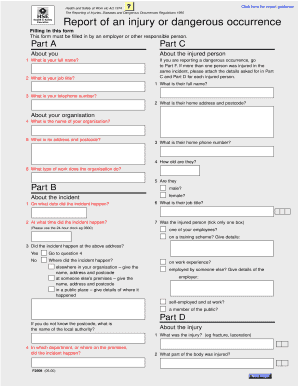
Aulted by a person Part H Your signature Signature Another kind of accident (describe it in Part G) Part F Date If returning by post/fax, please ensure this Dangerous occurrences form is signed, alternatively, if returning Enter the number of the dangerous occurrence you are reporting. (The numbers are given in the Regulations and in the notes which accompany this form) by E-Mail, please type your name in the For official use Client number Location number Where to send the form sign.

How it works

  1. Open form

    Open form follow the instructions

  2. Easily sign form

    Easily sign the form with your finger

  3. Share form

    Send filled & signed form or save

How to fill out the UK F2508 online

The UK F2508 form is essential for reporting injuries, diseases, and dangerous occurrences in the workplace. This guide provides clear, step-by-step instructions on how to complete the form online, ensuring that employers and responsible persons accurately report incidents.

Follow the steps to successfully complete the UK F2508 form online.

  1. Click ‘Get Form’ button to obtain the form and open it in the editor.
  2. In Part A, enter your full name and job title as the person filling out the form. Provide your telephone number and the name of your organization, along with its address and postcode.
  3. If reporting a dangerous occurrence, proceed to Part F. If multiple individuals were injured in the same incident, be sure to attach necessary details as instructed in Parts C and D for each injured party.
  4. Continue in Part B, detailing the incident. Fill in the date and time using the 24-hour clock. Specify the incident's location, whether at your organization, someone else’s premises, or in a public place.
  5. In Part D, describe the injury sustained, including its type and the affected body part. Select the appropriate category of injury as detailed in the form.
  6. Provide a detailed report about the incident in Part G, including any substances or machinery involved, and actions taken post-incident to prevent recurrence.
  7. In Part E, select the type of accident that matches the incident best. Make sure to tick only one box.
  8. Finally, in Part H, sign and date the form. If sending by post or fax, ensure that the form is signed; if emailing, type your name in the signature box.
  9. Once completed, make sure to save any changes. You may then download, print, or share the form as required.

Complete your documents online effortlessly and ensure accurate reporting of incidents.

Get form

Experience a faster way to fill out and sign forms on the web. Access the most extensive library of templates available.
Get form

Related content

Contaminant film thickness affects walkway...
by DD Chimich · 2022 · Cited by 4 — These four surfaces have been adopted by ASTM...
Learn more
H&S UK RIDDOR F2508
You are not authorized for this page. t. Help ...
Learn more
i"reed transformer co., inc.
These high qual.ity miniature, transform- ers are high efficien- cy audio components...
Learn more

Related links form

Email Pmcare 2020 Sample Request Form 2020 Taa Notice To Vacate Form Pdf 2020 Community Service Award Application Form 2020

Questions & Answers

Get answers to your most pressing questions about US Legal Forms API.

Contact support

To report specified injuries online, you can use the UK F2508 form. This form streamlines the reporting process, making it easy to submit your information quickly and efficiently. By completing this form, you meet the legal requirements for reporting incidents, ensuring that all necessary details are included for compliance.

RIDDOR stands for the Reporting of Injuries, Diseases and Dangerous Occurrences Regulations, which highlights its critical role in workplace safety. This legislation outlines the types of incidents that must be reported to ensure a safe working environment. Understanding RIDDOR is essential for employers and employees alike. The UK F2508 form plays a vital role in fulfilling these reporting requirements efficiently.

Yes, you can check if a RIDDOR incident has been reported, but it may require some direct communication with the HSE. Individuals typically need to provide specific details about the incident to obtain the necessary information. Maintaining transparency about RIDDOR reports can enhance your workplace's safety culture. Utilizing tools and resources related to the UK F2508 can streamline this verification process.

RIDDOR stands for the Reporting of Injuries, Diseases and Dangerous Occurrences Regulations. This UK legislation requires specific incidents to be reported to the Health and Safety Executive (HSE). The RIDDOR framework helps ensure workplace safety and accountability. Understanding its implications includes recognizing the significance of the UK F2508 form.

Under UK F2508, you must report work-related fatalities, specified injuries, and dangerous occurrences. Additionally, injuries resulting in more than seven days of incapacity may also necessitate reporting. Staying informed about what must be reported helps you achieve better safety standards and regulatory compliance in your organization.

When reporting under UK F2508, it’s essential to maintain records of incidents, including reporting forms and any follow-up actions taken. Keep documentation of any investigations and employee details involved in the incident. This comprehensive record-keeping not only fulfills legal requirements, but it also enhances overall workplace safety.

Incidents that qualify for reporting under UK F2508 include work-related deaths, specified injuries, and dangerous occurrences. Employers must report any accident that results in serious harm to an employee or can potentially lead to hazardous situations. Understanding what qualifies can help maintain a safe working environment and secure compliance.

To report a RIDDOR injury, utilize the online reporting form specified under UK F2508. This process requires you to provide detailed information about the incident, including circumstances, involved parties, and the nature of the injury. By using reliable resources like US Legal Forms, you can ensure your report meets all regulatory requirements.

The online form used for reporting specified injuries under UK F2508 is typically a RIDDOR report form. This digital form streamlines the reporting process, making it easier for employers to fulfill their legal obligations. Accessing US Legal Forms can provide you with the necessary templates to ensure your report is accurate and complies with RIDDOR standards.

Specified injuries reportable under UK F2508 include fractures, amputations, serious burns, loss of sight, and any injury causing a person to be incapacitated for over seven days. These incidents trigger immediate reporting obligations to ensure workplace safety. Awareness of these specified injuries helps employers take swift action and maintain compliance.

Get This Form Now!

Use professional pre-built templates to fill in and sign documents online faster. Get access to thousands of forms.
Get form
If you believe that this page should be taken down, please follow our DMCA take down processhere.

Industry-leading security and compliance

US Legal Forms protects your data by complying with industry-specific security standards.
  • In businnes since 1997
    25+ years providing professional legal documents.
  • Accredited business
    Guarantees that a business meets BBB accreditation standards in the US and Canada.
  • Secured by Braintree
    Validated Level 1 PCI DSS compliant payment gateway that accepts most major credit and debit card brands from across the globe.
Get UK F2508
Get form
Form Packages
Adoption
Bankruptcy
Contractors
Divorce
Home Sales
Employment
Identity Theft
Incorporation
Landlord Tenant
Living Trust
Name Change
Personal Planning
Small Business
Wills & Estates
Packages A-Z
Form Categories
Affidavits
Bankruptcy
Bill of Sale
Corporate - LLC
Divorce
Employment
Identity Theft
Internet Technology
Landlord Tenant
Living Wills
Name Change
Power of Attorney
Real Estate
Small Estates
Wills
All Forms
Forms A-Z
Form Library
Customer Service
Your Privacy Choices
Terms of Service
Privacy Notice
Legal Hub
Content Takedown Policy
Bug Bounty Program
About Us
Help Portal
Legal Resources
Blog
Affiliates
Contact Us
Delete My Account
Site Map
Industries
Forms in Spanish
Localized Forms
State-specific Forms
Forms Kit
Legal Guides
Real Estate Handbook
All Guides
Prepared for You
Notarize
Incorporation services
Our Customers
For Consumers
For Small Business
For Attorneys
Our Sites
US Legal Forms
USLegal
FormsPass
pdfFiller
signNow
altaFlow
DocHub
Instapage
Social Media
Call us now toll free:
+1 833 426 79 33
As seen in:
  • USA Today logo picture
  • CBC News logo picture
  • LA Times logo picture
  • The Washington Post logo picture
  • AP logo picture
  • Forbes logo picture
© Copyright 1997-2025
airSlate Legal Forms, Inc.
3720 Flowood Dr, Flowood, Mississippi 39232
Form Packages
Adoption
Bankruptcy
Contractors
Divorce
Home Sales
Employment
Identity Theft
Incorporation
Landlord Tenant
Living Trust
Name Change
Personal Planning
Small Business
Wills & Estates
Packages A-Z
Form Categories
Affidavits
Bankruptcy
Bill of Sale
Corporate - LLC
Divorce
Employment
Identity Theft
Internet Technology
Landlord Tenant
Living Wills
Name Change
Power of Attorney
Real Estate
Small Estates
Wills
All Forms
Forms A-Z
Form Library
Customer Service
Your Privacy Choices
Terms of Service
Privacy Notice
Legal Hub
Content Takedown Policy
Bug Bounty Program
About Us
Help Portal
Legal Resources
Blog
Affiliates
Contact Us
Delete My Account
Site Map
Industries
Forms in Spanish
Localized Forms
State-specific Forms
Forms Kit
Legal Guides
Real Estate Handbook
All Guides
Prepared for You
Notarize
Incorporation services
Our Customers
For Consumers
For Small Business
For Attorneys
Our Sites
US Legal Forms
USLegal
FormsPass
pdfFiller
signNow
altaFlow
DocHub
Instapage
Social Media
Call us now toll free:
+1 833 426 79 33
As seen in:
  • USA Today logo picture
  • CBC News logo picture
  • LA Times logo picture
  • The Washington Post logo picture
  • AP logo picture
  • Forbes logo picture
© Copyright 1997-2025
airSlate Legal Forms, Inc.
3720 Flowood Dr, Flowood, Mississippi 39232