Loading
Get Ph Bir 1906 2018-2025
How it works
-

Open form follow the instructions
-

Easily sign the form with your finger
-

Send filled & signed form or save
How to fill out the PH BIR 1906 online
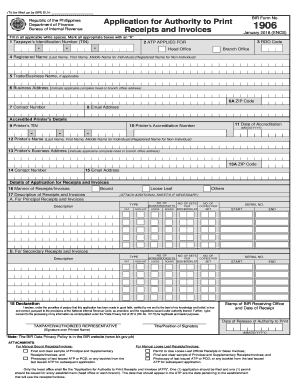
Completing the PH BIR 1906 form online is a straightforward process designed for users seeking to apply for authority to print receipts and invoices. This guide will provide clear, step-by-step instructions to ensure that you can efficiently and accurately fill out this important document.
Follow the steps to submit your application effortlessly.
- Click ‘Get Form’ button to obtain the form and open it in the editor.
- Begin by entering your Taxpayer’s Identification Number (TIN) in the designated field. Ensure the number is correct to avoid any application delays.
- Input the RDO code associated with your registration. This code helps identify your local revenue district office.
- Indicate the type of ATP applied for by marking the appropriate box for either 'Head Office' or 'Branch Office'.
- Fill in the registered name in the format specified. For individuals, provide Last Name, First Name, and Middle Name. For non-individuals, enter the registered name.
- If applicable, write down your Trade/Business Name in the next field.
- Provide your complete Business Address. This should be the address of your head or branch office.
- Enter the ZIP code corresponding to your business address.
- Provide your Contact Number to ensure you can be reached if necessary.
- Input your Email Address for communication purposes.
- Under 'Accredited Printer’s Details', enter the Printer’s TIN.
- Fill in the Printer’s Accreditation Number.
- Input the Date of Accreditation in the required format (MM/DD/YYYY).
- Provide the Printer’s Name in the same format as the registered name provided earlier.
- Fill in the Printer’s Business Address. Ensure the address is accurate.
- Enter the Printer’s ZIP Code.
- Provide the Printer’s Contact Number.
- Input the Printer’s Email Address.
- In the details of application for receipts and invoices, indicate the manner of receipts/invoices by marking either 'Bound', 'Loose Leaf', or 'Others'.
- Complete the 'Description of Receipts and Invoices' section, specifying details such as the number of boxes/booklets, type, and number of copies as required.
- In the declaration area, confirm the accuracy of the information provided by signing in the designated space.
- After completing all fields, users can save changes, download, print, or share the filled-out form as needed.
Take the next step towards completing your application by filling out the PH BIR 1906 online today.
Related links form
Industry-leading security and compliance
US Legal Forms protects your data by complying with industry-specific security standards.
-
In businnes since 199725+ years providing professional legal documents.
-
Accredited businessGuarantees that a business meets BBB accreditation standards in the US and Canada.
-
Secured by BraintreeValidated Level 1 PCI DSS compliant payment gateway that accepts most major credit and debit card brands from across the globe.