Loading
Get Uk Smp1 2014-2025
How it works
-

Open form follow the instructions
-

Easily sign the form with your finger
-

Send filled & signed form or save
How to fill out the UK SMP1 online
This guide provides clear instructions for filling out the UK SMP1 form online. It is designed to support users with varying levels of experience in completing statutory maternity pay documentation.
Follow the steps to complete the SMP1 form effectively.
- Click the ‘Get Form’ button to obtain the SMP1 form and open it in your preferred online editor.
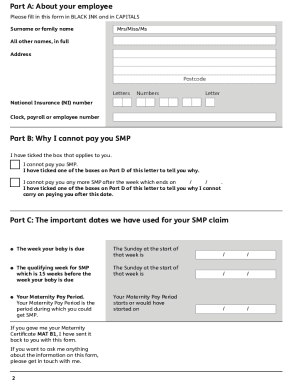
- In Part A, provide your employee's surname or family name, all other names in full, and their address, including the postcode. Ensure this is completed in black ink and in capital letters.
- Fill in the National Insurance number and include the clock, payroll, or employee number associated with your employee.
- Move to Part B and indicate why you cannot pay Statutory Maternity Pay (SMP) by ticking the applicable boxes. Specify the date after which you can no longer pay SMP.
- In Part C, provide the important dates related to the SMP claim—specifically, the qualifying week, the starting date of the Maternity Pay Period, and the date your baby is due.
- Proceed to Part D and tick the boxes to detail why you cannot pay SMP. This includes reasons like the employee's length of service, average earnings, or notice periods.
- Complete Part E by signing the employer’s declaration. Include the employer’s name, signature, date, position, phone number, fax number, email address, and the employer’s address, ensuring all information is accurate.
- Once all parts are filled out completely and accurately, review the form to ensure there are no mistakes. After final checks, save the changes, and download, print, or share the completed form as needed.
Complete your documents online today for a streamlined experience.
Related links form
You can obtain a maternity form from your employer, as they typically provide all necessary maternity-related documentation. If you prefer an easy download option, consider visiting official government websites, which may offer the relevant forms. Utilizing platforms like USLegalForms can simplify the process of accessing and submitting maternity forms.
Industry-leading security and compliance
US Legal Forms protects your data by complying with industry-specific security standards.
-
In businnes since 199725+ years providing professional legal documents.
-
Accredited businessGuarantees that a business meets BBB accreditation standards in the US and Canada.
-
Secured by BraintreeValidated Level 1 PCI DSS compliant payment gateway that accepts most major credit and debit card brands from across the globe.