Loading
Get Canada Td Bank 524386 2015-2026
How it works
-

Open form follow the instructions
-

Easily sign the form with your finger
-

Send filled & signed form or save
How to fill out the Canada TD Bank 524386 online
This guide provides step-by-step instructions for completing the Canada TD Bank 524386 form online. Whether you are making a charitable donation of securities or transferring your account, this comprehensive guide will help you navigate the process with ease.
Follow the steps to complete your form accurately
- Click ‘Get Form’ button to access the Canada TD Bank 524386 form online.
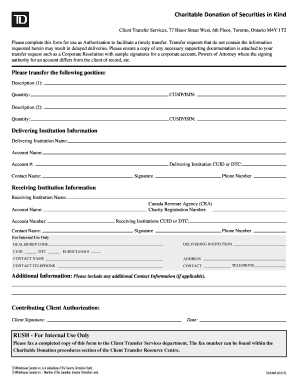
- Begin by entering the details for the securities you wish to transfer. Fill in the Description, Quantity, and CUSIP/ISIN for each position you want to donate. Ensure the descriptions are accurate to avoid delays.
- Proceed to the Delivering Institution Information section. Enter the Delivering Institution Name, Account Name, Account Number, CUID or DTC, and the contact person's name. This information is critical for the processing of your transfer.
- In the Receiving Institution Information section, provide the name of the Canada Revenue Agency, along with the Charity Registration Number, Account Name, CUID or DTC, Account Number, contact name, and their phone number.
- Sign the form in the Signature field and include your phone number. This step confirms your authorization for the transfer.
- Complete the Contributing Client Authorization section by signing and dating the form. This indicates your agreement with the transfer process.
- After filling out all the required fields, review the form for accuracy. Save your changes, then download, print, or share the completed form as necessary.
Complete your documents online today to facilitate your securities transfer smoothly.
Related links form
The bank account linked to your mutual fund account will be credited or debited usually the next business day (not guaranteed) and within three business days.