Loading
Form preview
  • US Legal Forms
  • Other Templates
  • Other Forms
  • Mississippi Other Forms
  • Ms Teacher Appraisal Rubric

Get Ms Teacher Appraisal Rubric

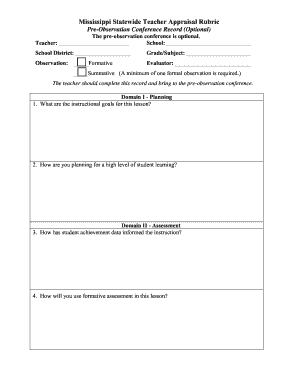
_____________ School District: ___________________ Grade/Subject: ______________________ Observation: _____Formative Evaluator: __________________________ _____Summative (A minimum of one formal observation is required.) The teacher should complete this record and bring to the pre-observation conference. Domain I - Planning 1. What are the instructional goals for this lesson? 2. How are you planning for a high level of student learning? Domain II - Assessment 3. How has student achievement.

How it works

  1. Open form

    Open form follow the instructions

  2. Easily sign form

    Easily sign the form with your finger

  3. Share form

    Send filled & signed form or save

How to fill out the MS Teacher Appraisal Rubric online

Filling out the Mississippi Statewide Teacher Appraisal Rubric online is essential for facilitating effective evaluations. This guide provides clear, step-by-step instructions to help you complete the form efficiently and accurately.

Follow the steps to complete the MS Teacher Appraisal Rubric online.

  1. Click 'Get Form' button to obtain the form and access it in the editing interface.
  2. Begin by entering your name in the field labeled 'Teacher.' Follow this by providing the name of your 'School' and 'School District.'
  3. Indicate the 'Grade/Subject' you teach and select whether the observation is formative or summative. Note that a minimum of one formal observation is required for summative evaluations.
  4. In 'Domain I - Planning,' outline the instructional goals for your lesson and describe how you plan to ensure a high level of student learning.
  5. In 'Domain II - Assessment,' reflect on how student achievement data has influenced your instruction and explain your use of formative assessment for the lesson.
  6. Move to 'Domain III - Instruction' and detail how you will differentiate instruction to cater to all students' needs. Also, describe how you intend to engage students actively in the learning process.
  7. For 'Domain IV - Learning Environment,' indicate how you will maximize instructional time during the lesson.
  8. In 'Domain V - Professional Responsibilities,' explain how you will incorporate professional learning into your lesson. Use the optional 'Teacher comments' section for any additional notes or reflections.
  9. If applicable, note any artifacts discussed during the observation and check 'Yes' or 'No' accordingly.
  10. Finally, sign and date the 'Teacher signature' and the 'Evaluator signature' fields to finalize the document.
  11. Once you have completed all the fields, save your changes, and you can choose to download, print, or share the form as needed.

Complete your document online to ensure an effective evaluation process.

Get form

Experience a faster way to fill out and sign forms on the web. Access the most extensive library of templates available.
Get form

Related content

MISSISSIPPI TEACHER APPRAISAL INSTRUMENT ...
Plans lessons that demonstrate knowledge of content and pedagogy. Unsatisfactory...
Learn more
Administrator Perceptions of Appropriateness by...
by DI Moore · 2017 · Cited by 1 — Mississippi Statewide Teacher Appraisal Rubric...
Learn more
Evaluating the School Principal
by A AN · 2010 · Cited by 2 — The committee asked school administrators to use the...
Learn more

Related links form

Choir Adjudication Form Dodl Application Form 2020 Morocco Online Visa Application Form 2020 Rental Agreement And Deposit Receipt 2020

Questions & Answers

Get answers to your most pressing questions about US Legal Forms API.

Contact support

To write an evaluation for a teacher, start with a clear outline based on specific criteria and observations. Assess their performance relative to the standards set in your rubric. The MS Teacher Appraisal Rubric is a useful tool that can guide you in providing constructive feedback that promotes professional development.

Writing a teacher evaluation report requires summarizing the findings from observations, assessments, and feedback. It should highlight strengths and areas for improvement, providing actionable suggestions. Using the MS Teacher Appraisal Rubric during the evaluation will make compiling the report easier and more precise.

The teacher appraisal process typically includes goal setting, self-assessment, classroom observations, and feedback sessions. It aims to foster professional growth and improve teaching quality over time. By integrating the MS Teacher Appraisal Rubric, institutions can ensure a structured and fair appraisal process.

Conducting a teacher appraisal involves observing classroom practices, collecting data on student performance, and reviewing instructional planning. Documenting the findings using a standardized rubric can greatly enhance the appraisal process. The MS Teacher Appraisal Rubric provides a clear guide for this systematic evaluation.

A good teacher evaluation score typically demonstrates a teacher's effectiveness in meeting performance standards. Scores can vary based on the rubric used, but higher scores usually reflect strong instructional practices. Utilizing the MS Teacher Appraisal Rubric can help define what constitutes a good score for your institution.

A rubric in evaluation is a scoring guide that outlines specific criteria to assess performance. It breaks down the expectations into clear categories, helping both the evaluator and the evaluated understand the standards. The MS Teacher Appraisal Rubric exemplifies this method, ensuring consistency in evaluations.

Evaluating a teacher’s performance involves observing their teaching methods, reviewing lesson plans, and gathering student outcomes. Feedback from peers and self-reflection also plays a crucial role in this process. Employing the MS Teacher Appraisal Rubric provides a standardized approach for a thorough evaluation.

A teacher evaluation rubric is a tool that defines the criteria for assessing a teacher’s instructional practices. It offers a detailed description of various performance levels, making it easier for evaluators to provide objective feedback. The MS Teacher Appraisal Rubric can be integrated into this evaluation process for enhanced clarity.

Writing an appraisal for a teacher involves gathering evidence of their performance against established standards. Begin by reviewing lesson plans, student feedback, and classroom observations to create an informed evaluation. Using the MS Teacher Appraisal Rubric can streamline this process and ensure consistency in evaluation.

The five dimensions of teaching rubrics typically include planning and preparation, classroom environment, instruction, professional responsibilities, and community engagement. These dimensions collectively provide a comprehensive overview of a teacher’s performance. Schools can utilize the MS Teacher Appraisal Rubric to ensure each dimension is thoroughly assessed.

Get This Form Now!

Use professional pre-built templates to fill in and sign documents online faster. Get access to thousands of forms.
Get form
If you believe that this page should be taken down, please follow our DMCA take down processhere.
Get MS Teacher Appraisal Rubric
Get form
  • Adoption
  • Bankruptcy
  • Contractors
  • Divorce
  • Home Sales
  • Employment
  • Identity Theft
  • Incorporation
  • Landlord Tenant
  • Living Trust
  • Name Change
  • Personal Planning
  • Small Business
  • Wills & Estates
  • Packages A-Z
  • Affidavits
  • Bankruptcy
  • Bill of Sale
  • Corporate - LLC
  • Divorce
  • Employment
  • Identity Theft
  • Internet Technology
  • Landlord Tenant
  • Living Wills
  • Name Change
  • Power of Attorney
  • Real Estate
  • Small Estates
  • Wills
  • All Forms
  • Forms A-Z
  • Other Templates
  • Legal Hub
  • About Us
  • Help Portal
  • Legal Resources
  • Blog
  • Affiliates
  • Contact Us
  • Delete My Account
  • Site Map
  • Industries
  • Forms in Spanish
  • Localized Forms
  • State-specific Forms
  • Forms Kit
  • Real Estate Handbook
  • All Guides
  • Notarize
  • Incorporation services
  • For Consumers
  • For Small Business
  • For Attorneys
  • USLegal
  • FormsPass
  • pdfFiller
  • signNow
  • altaFlow
  • DocHub
  • Instapage
Form Packages
  • Adoption
  • Bankruptcy
  • Contractors
  • Divorce
  • Home Sales
  • Employment
  • Identity Theft
  • Incorporation
  • Landlord Tenant
  • Living Trust
  • Name Change
  • Personal Planning
  • Small Business
  • Wills & Estates
  • Packages A-Z
Form Categories
  • Affidavits
  • Bankruptcy
  • Bill of Sale
  • Corporate - LLC
  • Divorce
  • Employment
  • Identity Theft
  • Internet Technology
  • Landlord Tenant
  • Living Wills
  • Name Change
  • Power of Attorney
  • Real Estate
  • Small Estates
  • Wills
  • All Forms
  • Forms A-Z
  • Other Templates
Customer Service
  • Legal Hub
  • About Us
  • Help Portal
  • Legal Resources
  • Blog
  • Affiliates
  • Contact Us
  • Delete My Account
  • Site Map
  • Industries
  • Forms in Spanish
  • Localized Forms
  • State-specific Forms
  • Forms Kit
Legal Guides
  • Real Estate Handbook
  • All Guides
Prepared for you
  • Notarize
  • Incorporation services
Our Customers
  • For Consumers
  • For Small Business
  • For Attorneys
Our Sites
  • USLegal
  • FormsPass
  • pdfFiller
  • signNow
  • altaFlow
  • DocHub
  • Instapage
Social Media
Call us now toll free:
+1 833 426 79 33
As seen in:
© Copyright 1999-2026 airSlate Legal Forms, Inc. 17 Station Street, Suite 303, Brookline, MA 02445
  • Your Privacy Choices
  • Terms of Service
  • Privacy Notice
  • Content Takedown Policy
  • Bug Bounty Program