Get Hi Hrd 315a 2011
How it works
-

Open form follow the instructions
-

Easily sign the form with your finger
-

Send filled & signed form or save
How to fill out the HI HRD 315A online
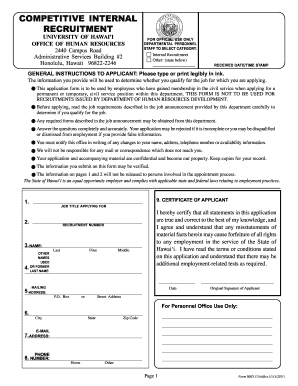
The HI HRD 315A form is essential for individuals applying for civil service positions within the University of Hawai'i. This guide provides a comprehensive overview of how to complete the form online, ensuring users meet the essential requirements for their applications.
Follow the steps to successfully complete the HI HRD 315A form online.
- Press the ‘Get Form’ button to access the form. Once clicked, it will open in an editable format for you to fill in your information.
- Begin by entering the job title you are applying for in the designated field, ensuring it matches the position specified in the job announcement.
- Provide the recruitment number associated with the job application in the respective section to avoid processing delays.
- In the fields for name, enter your last name, first name, and middle name as they appear on your legal documents.
- Update your mailing address accurately, including P.O. Box or street address, city, state, and zip code.
- Enter your email address and phone number, ensuring they are current so the Office of Human Resources can contact you.
- Fill out the education history section by listing the last grade school attended along with whether you graduated or received a GED.
- Complete the training section detailing any relevant training, including business, trade, or military training and the qualifications received.
- In the sections for licenses and certifications, indicate if you hold a valid driver’s license and provide the necessary details as requested.
- Detail your employment history, beginning with your most recent job. Describe your roles, responsibilities, and any supervisory positions held.
- Review all your entries for accuracy, ensuring you have answered all questions thoroughly and legibly.
- Once completed, save your changes, and prepare to download or print the form for submission.
Complete your application for the HI HRD 315A form online today to enhance your employment opportunities.
Get form
Filling out the Employee Withholding Certificate form involves a few straightforward steps. First, gather your personal information, including your Social Security number and filing status. Next, refer to the instructions provided with the HI HRD 315A to ensure accurate completion. If you seek additional assistance, consider resources on USLegalForms, as they offer comprehensive guidance for completing such forms.
Get This Form Now!
Industry-leading security and compliance
-
In businnes since 199725+ years providing professional legal documents.
-
Accredited businessGuarantees that a business meets BBB accreditation standards in the US and Canada.
-
Secured by BraintreeValidated Level 1 PCI DSS compliant payment gateway that accepts most major credit and debit card brands from across the globe.