Loading
Form preview
  • US Legal Forms
  • Form Library
  • Miscellaneous Forms
  • Multi-State Miscellaneous Forms
  • Sf 270-102 1996

Get Sf 270-102 1996-2025

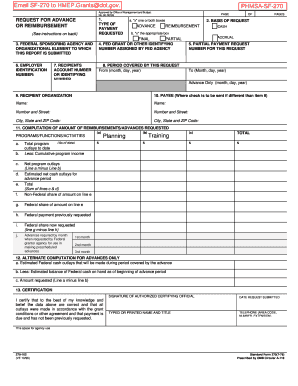
Email SF-270 to HMEP. Grants dot. gov. PHMSA-SF-270 Approved by Office of Management and Budget. No. 80-R0183 REQUEST FOR ADVANCE OR REIMBURSEMENT See instructions on back 3. FEDERAL SPONSORING AGENCY AND ORGANIZATIONAL ELEMENT TO WHICH THIS REPORT IS SUBMITTED 6. EMPLOYER IDENTIFICATION NUMBER 7. RECIPIENTS ACCOUNT NUMBER OR IDENTIFYING TYPE OF PAYMENT REQUESTED PAGE a* x one or both boxes ADVANCE OF 2. BASIS OF REQUEST CASH b. x the appropriate box ACCRUAL FINAL PARTIAL 4. FED GRANT OR OTHER IDENTIFYING NUMBER ASSIGNED BY FED AGENCY 5. PARTIAL PAYMENT REQUEST NUMBER FOR THIS REQUEST 8. PERIOD COVERED BY THIS REQUEST From month day year To Month day year Advance Only month day year 9. RECIPIENT ORGANIZATION 10. PAYEE Where check is to be sent if different than item 9 Name Number and Street City State and ZIP Code 11. COMPUTATION OF AMOUNT OF REIMBURSEMENTS/ADVANCES REQUESTED PROGRAMS/FUNCTIONS/ACTIVITIES a* b. c* As of date Total program outlays to date Less Cumulative program income ....

How it works

  1. Open form

    Open form follow the instructions

  2. Easily sign form

    Easily sign the form with your finger

  3. Share form

    Send filled & signed form or save

How to fill out the SF 270-102 online

The SF 270-102, also known as the request for advance or reimbursement form, is a crucial document when seeking federal grants. This guide will provide you with a comprehensive, step-by-step approach to effectively complete this form online.

Follow the steps to successfully complete the SF 270-102 form.

  1. Click ‘Get Form’ button to obtain the SF 270-102 and open it in the editor.
  2. Select the type of payment requested by marking the appropriate box for either 'advance' or 'reimbursement'. Make sure to indicate if the request is for cash or accrual.
  3. Fill in the federal sponsoring agency and organizational element to which the report is submitted in section 3.
  4. Enter your employer identification number in section 6. This number is crucial for identifying your organization.
  5. Provide the recipient's account number or identifying number in section 7, as it relates to the funding request.
  6. In section 4, input the federal grant or other identifying number assigned by the federal agency.
  7. If requesting a partial payment, fill in the request number for this particular request in section 5.
  8. Detail the period covered by your request in section 8, specifying both start and end dates.
  9. In section 9, enter the name and address of the recipient organization.
  10. If the payee differs from the recipient organization, provide their details in section 10.
  11. Navigate to section 11 and compute the amount of reimbursements or advances requested, detailing each activity and providing relevant financial information.
  12. Complete section 12 if you are requesting advances only, providing an estimated federal cash outlay.
  13. In section 13, certify the correctness of the provided data by signing and dating the form. Include your printed name, title, and contact number.
  14. Once all required fields are completed, save your changes. You may then download, print, or share the form as necessary.

Start completing your SF 270-102 online today to ensure prompt processing of your request.

Get form

Experience a faster way to fill out and sign forms on the web. Access the most extensive library of templates available.
Get form

Related content

Form SF270: Request for Advance or Reimbursement...
b. Menos: Ingreso acumulativo del programa c. Desembolsos netos del programa. (Línea a...
Learn more
proposal award policies procedures guide
SF LLL, Disclosure of Lobbying Activities (if applicable). (One copy only ... 270-102...
Learn more

Related links form

Finance Clearance Certificate Rosebank Application Form Form G Ppf Priesthood Endorsement Form

Questions & Answers

Get answers to your most pressing questions about US Legal Forms API.

Contact support

An SF 270, also known as the SF 270-102, is a standardized government form required for seeking reimbursements and advances on federal contracts. It captures vital data, including the type of project and funding details. Understanding and completing the SF 270-102 properly can lead to a smoother process for receiving funds. Uslegalforms has templates and guides to facilitate your completion of this important document.

You should use the SF 270-102 when you need to request advance or reimbursement payments for federal contracts or grants. It is critical for contractors working on federally funded projects to utilize this form accurately and timely. Submitting the SF 270-102 helps maintain transparency and communication between you and the contracting agency. For assistance, consider using Uslegalforms to streamline your application process.

The 270 form generally refers to a series of documents used for various purposes across different sectors. However, in the context of grant reimbursement, it often refers to the SF 270-102 form, which specifically addresses reimbursement requests for funded projects. Familiarizing yourself with the SF 270-102 form enhances your understanding of financial accountability in grant management.

The 424 form, often linked with grant applications, is a standard form used to apply for federal assistance or funding. It collects vital information about the applicant and the proposed project, ensuring transparency and compliance with government requirements. Completing the related SF 270-102 accurately helps secure the funding needed for your initiatives.

A reimbursement request form allows individuals or organizations to claim back funds they have spent on approved expenses. Typically tied to grants or contracts, it ensures that the expenses are justifiable and properly documented. Utilizing the SF 270-102 form can streamline this process, making it easier for you to receive the funds you deserve.

SF 270 is a request for reimbursement form used by organizations and grant recipients to recover funds that have been spent on specific projects. It simplifies the reimbursement process by documenting eligible costs, ensuring accountability, and facilitating timely payments. Understanding SF 270-102 is essential for navigating funding responsibilities effectively.

Used by recipients to request advances or reimbursement on all non-construction programs when the advance payment or reimbursement methods are used.

Get This Form Now!

Use professional pre-built templates to fill in and sign documents online faster. Get access to thousands of forms.
Get form
If you believe that this page should be taken down, please follow our DMCA take down processhere.

Industry-leading security and compliance

US Legal Forms protects your data by complying with industry-specific security standards.
  • In businnes since 1997
    25+ years providing professional legal documents.
  • Accredited business
    Guarantees that a business meets BBB accreditation standards in the US and Canada.
  • Secured by Braintree
    Validated Level 1 PCI DSS compliant payment gateway that accepts most major credit and debit card brands from across the globe.
Get SF 270-102
Get form
Form Packages
Adoption
Bankruptcy
Contractors
Divorce
Home Sales
Employment
Identity Theft
Incorporation
Landlord Tenant
Living Trust
Name Change
Personal Planning
Small Business
Wills & Estates
Packages A-Z
Form Categories
Affidavits
Bankruptcy
Bill of Sale
Corporate - LLC
Divorce
Employment
Identity Theft
Internet Technology
Landlord Tenant
Living Wills
Name Change
Power of Attorney
Real Estate
Small Estates
Wills
All Forms
Forms A-Z
Form Library
Customer Service
Your Privacy Choices
Terms of Service
Privacy Notice
Legal Hub
Content Takedown Policy
Bug Bounty Program
About Us
Help Portal
Legal Resources
Blog
Affiliates
Contact Us
Delete My Account
Site Map
Industries
Forms in Spanish
Localized Forms
State-specific Forms
Forms Kit
Legal Guides
Real Estate Handbook
All Guides
Prepared for You
Notarize
Incorporation services
Our Customers
For Consumers
For Small Business
For Attorneys
Our Sites
US Legal Forms
USLegal
FormsPass
pdfFiller
signNow
altaFlow
DocHub
Instapage
Social Media
Call us now toll free:
+1 833 426 79 33
As seen in:
  • USA Today logo picture
  • CBC News logo picture
  • LA Times logo picture
  • The Washington Post logo picture
  • AP logo picture
  • Forbes logo picture
© Copyright 1997-2025
airSlate Legal Forms, Inc.
3720 Flowood Dr, Flowood, Mississippi 39232
Form Packages
Adoption
Bankruptcy
Contractors
Divorce
Home Sales
Employment
Identity Theft
Incorporation
Landlord Tenant
Living Trust
Name Change
Personal Planning
Small Business
Wills & Estates
Packages A-Z
Form Categories
Affidavits
Bankruptcy
Bill of Sale
Corporate - LLC
Divorce
Employment
Identity Theft
Internet Technology
Landlord Tenant
Living Wills
Name Change
Power of Attorney
Real Estate
Small Estates
Wills
All Forms
Forms A-Z
Form Library
Customer Service
Your Privacy Choices
Terms of Service
Privacy Notice
Legal Hub
Content Takedown Policy
Bug Bounty Program
About Us
Help Portal
Legal Resources
Blog
Affiliates
Contact Us
Delete My Account
Site Map
Industries
Forms in Spanish
Localized Forms
State-specific Forms
Forms Kit
Legal Guides
Real Estate Handbook
All Guides
Prepared for You
Notarize
Incorporation services
Our Customers
For Consumers
For Small Business
For Attorneys
Our Sites
US Legal Forms
USLegal
FormsPass
pdfFiller
signNow
altaFlow
DocHub
Instapage
Social Media
Call us now toll free:
+1 833 426 79 33
As seen in:
  • USA Today logo picture
  • CBC News logo picture
  • LA Times logo picture
  • The Washington Post logo picture
  • AP logo picture
  • Forbes logo picture
© Copyright 1997-2025
airSlate Legal Forms, Inc.
3720 Flowood Dr, Flowood, Mississippi 39232