Loading
Get Mcs 63
How it works
-

Open form follow the instructions
-

Easily sign the form with your finger
-

Send filled & signed form or save
How to fill out the Mcs 63 online
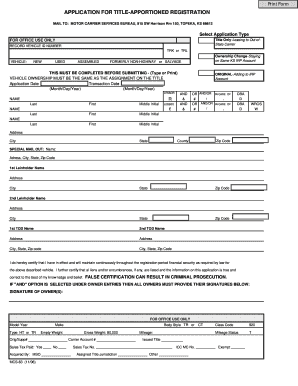
The Mcs 63 form is essential for applying for title-apportioned registration of vehicles. This guide will help you navigate each section of the form, ensuring that your submission is accurate and complete.
Follow the steps to successfully complete the Mcs 63 online.
- Press the ‘Get Form’ button to obtain the Mcs 63 form and open it in your preferred online editor.
- Begin by selecting the appropriate application type at the top of the form. Indicate whether you are applying for 'Title Only-Leasing to Out-of-State Carrier' or 'Ownership Change-Staying on Same KS IRP Account.'
- Fill in the application date and transaction date using the format of Month/Day/Year.
- Provide the names of the lessor and lessee. Ensure that the ownership matches the assignment on the title. Include the last name, first name, and middle initial for each party.
- Complete sections related to the vehicle's details, such as the vehicle ID number, whether the vehicle is new, used, or assembled, and address information.
- If applicable, provide the Special Mail Out information by entering the name and complete address.
- List the first lienholder's information, including their name and address.
- If there are transfer on death (TOD) beneficiaries, provide their names and addresses for the first and second TOD options.
- Certify your financial security by affirming that you have coverage as required by law for the vehicle described. This is a critical step as false certification can lead to legal consequences.
- If you selected the 'AND' option under owner entries, make sure all owners sign in the designated area.
- Fill in the vehicle's model year, make, body style, empty weight, gross weight, sales tax status, and any additional identification numbers necessary for processing.
- Once you have completed all sections of the form, review your entries for accuracy. Save your changes, and choose to download, print, or share the form as needed.
Complete your Mcs 63 form online today and ensure your vehicle registration is processed smoothly.
Related links form
What mileage do you put on MCS-150? A carrier should use the combined annual mileage from all commercial vehicles in its fleet and round the number to the closest 10,000. This number will be used to determine a carrier's safety liability and determine whether an intervention may be necessary.
Industry-leading security and compliance
US Legal Forms protects your data by complying with industry-specific security standards.
-
In businnes since 199725+ years providing professional legal documents.
-
Accredited businessGuarantees that a business meets BBB accreditation standards in the US and Canada.
-
Secured by BraintreeValidated Level 1 PCI DSS compliant payment gateway that accepts most major credit and debit card brands from across the globe.