Loading
Get Notice To Provider
How it works
-

Open form follow the instructions
-

Easily sign the form with your finger
-

Send filled & signed form or save
How to fill out the Notice To Provider online
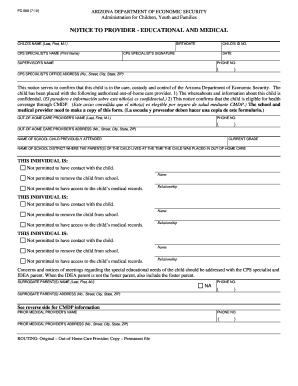
Filling out the Notice To Provider is an essential step for documenting the care and health coverage of a child in Arizona's foster care system. This guide will provide you with detailed instructions to complete the form accurately and efficiently online.
Follow the steps to complete the Notice To Provider online.
- Press the ‘Get Form’ button to access the Notice To Provider form and open it in your preferred online editor.
- Begin by entering the child's name in the designated field (Last, First, M.I.). This ensures clear identification of the child in care.
- Fill in the birthdate of the child accurately. Be careful to enter the format as specified on the form.
- Input the child's ID number, which is vital for linking the notice to the child's specific case.
- Next, include the CPS specialist's name, ensuring you print the name clearly in the specified field.
- Have the CPS specialist sign the form in the appropriate section to validate the notice.
- Indicate the date when the form is being filled out, as this is key for record-keeping purposes.
- Enter the supervisor’s name to establish a point of contact within the CPS.
- Provide the phone number of the CPS specialist, making it easier for any follow-up communications.
- Fill out the CPS specialist’s office address completely, including the number, street, city, state, and ZIP code.
- Document the out-of-home care provider’s name, ensuring to include their contact details accurately.
- Provide the phone number and full address for the out-of-home care provider to maintain transparency.
- Enter the name of the school the child previously attended, as well as their current grade, to facilitate educational continuity.
- Indicate the school district where the child’s parents lived at the time of placement to help with administrative tracking.
- Complete the sections detailing individuals not permitted to have contact or access to the child’s records, including their names and relationships.
- Lastly, ensure you review the entire form for accuracy, then save changes, and choose to download, print, or share the form as necessary.
Complete your online documents efficiently and ensure all information is accurately captured.
Related links form
Case records are not public information and must be requested using the instructions for requesting case file records.
Industry-leading security and compliance
US Legal Forms protects your data by complying with industry-specific security standards.
-
In businnes since 199725+ years providing professional legal documents.
-
Accredited businessGuarantees that a business meets BBB accreditation standards in the US and Canada.
-
Secured by BraintreeValidated Level 1 PCI DSS compliant payment gateway that accepts most major credit and debit card brands from across the globe.