Loading
Get Health Declaration Form
How it works
-

Open form follow the instructions
-

Easily sign the form with your finger
-

Send filled & signed form or save
How to fill out the Health Declaration Form online
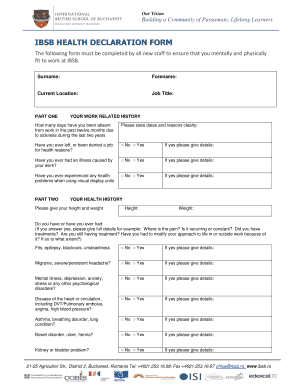
The Health Declaration Form is an essential document required from all new staff to ensure they are mentally and physically fit for work. This guide provides clear, step-by-step instructions on how to complete this form online.
Follow the steps to complete the form with ease.
- Press the ‘Get Form’ button to obtain the Health Declaration Form and open it in the editor.
- Fill out your personal information in the designated fields. This includes your surname, forename, current location, and job title.
- Move to 'Part One: Your Work Related History.' Provide details on any days you have been absent from work due to sickness in the last twelve months. Clearly state dates and reasons in the space provided.
- Answer the questions regarding your work-related illnesses. Indicate if you have ever left or been denied a job for health reasons, if you have experienced any health problems from using visual display units, and provide relevant details.
- Proceed to 'Part Two: Your Health History.' Here, input your height and weight, and provide detailed answers to the health-related questions, specifying any illnesses or conditions you may have had.
- Continue filling out the list of possible health conditions and medications in this section. Be as detailed as possible, especially if answering 'Yes' to any of the conditions.
- In 'Part Three: Immunisations,' indicate whether you have received various vaccinations and include the year received for each.
- Once all sections are completed, carefully read the declaration statement at the end of the form. Ensure all provided information is truthful and accurate.
- Sign and date the form in the provided fields to confirm that all the details are correct.
- After completing the form, you can save the changes, download a copy, print it for your records, or share it as required.
Complete your Health Declaration Form online to ensure a smooth onboarding process.
2:27 6:12 How to fill out US Customs Forms | Arriving in USA in 2021 - YouTube YouTube Start of suggested clip End of suggested clip Number. Then give your current street address in the united. States. At the same time if you don'tMoreNumber. Then give your current street address in the united. States. At the same time if you don't have an actual address and you're staying at a hotel it is important to mention. That.
Industry-leading security and compliance
US Legal Forms protects your data by complying with industry-specific security standards.
-
In businnes since 199725+ years providing professional legal documents.
-
Accredited businessGuarantees that a business meets BBB accreditation standards in the US and Canada.
-
Secured by BraintreeValidated Level 1 PCI DSS compliant payment gateway that accepts most major credit and debit card brands from across the globe.