Loading
Get Ny It-236 2021
How it works
-

Open form follow the instructions
-

Easily sign the form with your finger
-

Send filled & signed form or save
How to fill out the NY IT-236 online
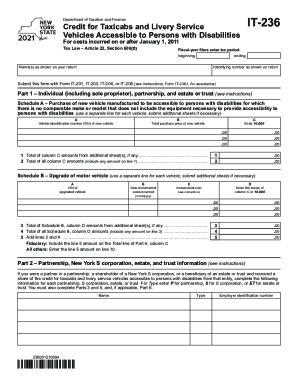
The NY IT-236 form is crucial for individuals and businesses seeking tax credits for vehicles accessible to persons with disabilities. This guide will provide step-by-step instructions to help users complete the form accurately and efficiently online.
Follow the steps to fill out the NY IT-236 form seamlessly.
- Click ‘Get Form’ button to access the NY IT-236 form. This will allow you to begin the process of filling out the necessary details.
- Enter your name(s) as shown on your return in the specified field.
- Provide your identifying number exactly as it appears on your return.
- Specify your tax period by filling in the beginning and ending dates for fiscal-year filers.
- In Part 1, indicate whether you are filing as an individual, partnership, or estate/trust. Proceed to Schedule A to record details about the purchase of a new vehicle that is accessible to persons with disabilities. Include the vehicle identification number (VIN), total purchase price, and the corresponding amounts for each vehicle.
- If applicable, complete Schedule B for upgrades made on existing vehicles. Note the VIN, date the costs were incurred, as well as the incremental costs. Enter the lesser amount of the incremental cost or $10,000.
- Sum up any totals from additional sheets, recording these in the respective lines to arrive at your total credits.
- Part 2 requires you to detail any shares of credits from partnerships or S corporations, entering the necessary information associated with each entity.
- In Part 3, indicate your share of the credit received for taxicabs and livery services accessible to persons with disabilities, ensuring all amounts are accurately calculated and entered.
- Proceed to Part 4, detailing the share of credit for beneficiaries and fiduciaries, entering identifying information and total amounts.
- In Part 5, compute your total credit from the amounts gathered in previous sections, ensuring total accuracy in your calculations.
- Complete Part 6 for the application of credits against tax due, noting any carryover credits from previous years.
- Once all sections are completed, review all entries for accuracy before saving changes. You will have the option to download, print, or share the completed form.
Complete your NY IT-236 form online now to ensure you receive your eligible credits.
Get form
Experience a faster way to fill out and sign forms on the web. Access the most extensive library of templates available.
Related links form
Get This Form Now!
Use professional pre-built templates to fill in and sign documents online faster. Get access to thousands of forms.
Industry-leading security and compliance
US Legal Forms protects your data by complying with industry-specific security standards.
-
In businnes since 199725+ years providing professional legal documents.
-
Accredited businessGuarantees that a business meets BBB accreditation standards in the US and Canada.
-
Secured by BraintreeValidated Level 1 PCI DSS compliant payment gateway that accepts most major credit and debit card brands from across the globe.