Loading
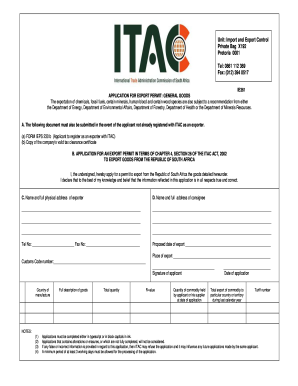
Get Za Itac Ie361
How it works
-

Open form follow the instructions
-

Easily sign the form with your finger
-

Send filled & signed form or save
How to fill out the ZA ITAC IE361 online
Filling out the ZA ITAC IE361 application for an export permit can seem daunting, but this guide provides clear, step-by-step instructions to assist you in completing the process accurately and efficiently. Ensure you gather all necessary information to streamline your submission.
Follow the steps to successfully complete the application.
- Press the ‘Get Form’ button to access the application and open it for editing.
- Begin by providing your name and full physical address as the exporter in the designated fields. Ensure that all information is accurate and complete.
- Next, input the name and full address of the consignee. This should include all necessary contact information, such as telephone and fax numbers.
- Indicate the proposed date of export and the place of export in the respective fields. Make sure these details align with your export plans.
- Fill in the customs code number that relates to the goods you are exporting.
- Provide the country of manufacture of the goods. This information is crucial for the processing of your application.
- Write a detailed description of the goods being exported. This should be as specific as possible to avoid complications.
- Enter the total quantity and R-value of the goods. Ensure these figures are accurate for your application.
- State the quantity of the commodity held by you or your supplier at the date of application. This information must reflect your current inventory.
- Indicate the total export of the commodity to the specific country or territory during the last calendar year for reference.
- Finally, enter the tariff number applicable to the goods being exported.
- After completing all sections, review the application for any errors. Once verified, you can save changes, download, print, or share the completed form.
Complete your ZA ITAC IE361 application online today for a smooth export process.
Which forms are required for registration as a Local Exporter? DA 185 – Application form – Registration and licensing of Customs and Excise Clients – External Form. DA 185.4A2 – Registration Client Type 4A2 – Exporter (Located or not located in the Republic) – External Form.
Industry-leading security and compliance
US Legal Forms protects your data by complying with industry-specific security standards.
-
In businnes since 199725+ years providing professional legal documents.
-
Accredited businessGuarantees that a business meets BBB accreditation standards in the US and Canada.
-
Secured by BraintreeValidated Level 1 PCI DSS compliant payment gateway that accepts most major credit and debit card brands from across the globe.