Loading
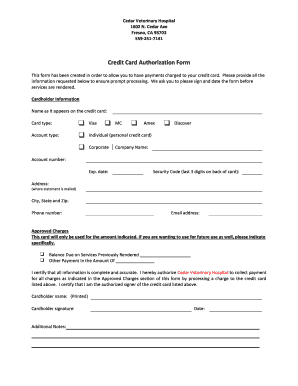
Get Ca Cedar Veterinary Hospital Credit Card Authorization Form
How it works
-

Open form follow the instructions
-

Easily sign the form with your finger
-

Send filled & signed form or save
How to fill out the CA Cedar Veterinary Hospital Credit Card Authorization Form online
Completing the CA Cedar Veterinary Hospital Credit Card Authorization Form online ensures a seamless payment process for your veterinary services. This guide will walk you through each section of the form, providing clear and detailed instructions to facilitate accurate submissions.
Follow the steps to fill out the form correctly.
- Click ‘Get Form’ button to obtain the form and open it in the editor.
- Fill out the cardholder information section. Enter the name as it appears on the credit card, select the card type (Visa, MasterCard, Amex, or Discover), and indicate if the card is personal or corporate. Ensure that you include the account number, expiration date, and the security code, which is the last three digits on the back of the card.
- Provide the billing address where the credit card statement is sent. Fill in the city, state, and zip code as well as a contact phone number.
- Enter your email address in the designated field for any confirmations or communications regarding your authorization.
- Complete the 'Approved Charges' section by indicating the balance due on services previously rendered and any additional payment amounts you wish to authorize the hospital to charge.
- Review the certification statement. Ensure that all provided information is complete and accurate. You will need to print your name, as the cardholder, and provide your signature to authorize Cedar Veterinary Hospital to charge the listed amounts.
- Finally, enter the date of completion to validate your authorization. Once all sections are filled, you can save changes, download, print, or share the completed form as necessary.
Complete your authorization form online now to ensure prompt payment processing.
How Does Payment or Credit Card Authorization Work? Step 1: The customer uses their credit card at checkout. ... Step 2: An authorization request is sent to the bank. ... Step 3: The request is approved or declined. ... A note about transaction fees.
Industry-leading security and compliance
US Legal Forms protects your data by complying with industry-specific security standards.
-
In businnes since 199725+ years providing professional legal documents.
-
Accredited businessGuarantees that a business meets BBB accreditation standards in the US and Canada.
-
Secured by BraintreeValidated Level 1 PCI DSS compliant payment gateway that accepts most major credit and debit card brands from across the globe.