Loading
Get Ny #s1000 2015-2025
How it works
-

Open form follow the instructions
-

Easily sign the form with your finger
-

Send filled & signed form or save
How to fill out the NY #S1000 online
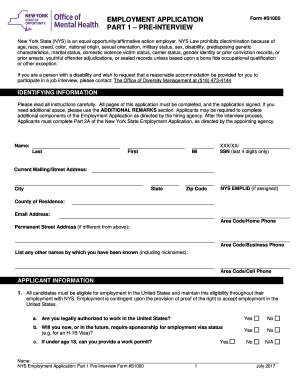
Filling out the NY #S1000 form is a crucial step in your employment application process with New York State. This guide offers clear, step-by-step instructions to help you complete the form accurately and effectively.
Follow the steps to properly complete the NY #S1000 form.
- Press the ‘Get Form’ button to access the NY #S1000 application form and open it in your online editor.
- Begin by providing your identifying information. Fill in your full name, current mailing address, email address, and contact numbers. Make sure to include the last four digits of your Social Security Number.
- Move on to the applicant information section. Confirm your eligibility to work in the United States by answering the questions about your employment authorization and any need for visa sponsorship.
- If the position involves operating a motor vehicle or heavy equipment, provide your valid driver license information, including the type and expiration date.
- For positions requiring professional licensure, complete the required fields for your trade or professional license. Include details such as the issuing authority and any restrictions on your license.
- Indicate any potential conflicts of interest by naming relatives employed by the hiring agency. If you do not have any relatives, check the provided box.
- Specify your job interests and employment availability. Complete the sections pertaining to work type desired, geographic locations, work schedule preferences, and your availability for starting work.
- Detail your education history. List all schools attended, the degrees received, and major areas of study. Be prepared to provide proof of your claimed educational credentials.
- List your employment history, starting with your most recent job. Include all relevant employment periods, job titles, and responsibilities. Note that a resume cannot substitute for this section.
- Provide professional references, including their names, relationships to you, and contact information.
- In the affirmation section, read the statements carefully. Confirm the accuracy of your provided information by signing and dating the form.
- Finally, review the entire application to ensure all sections are complete. Save your changes, download the form, or print it for your records, and share it as required.
Complete your NY #S1000 application online today to take the next step in your career.
The city flag is a vertical tricolor in blue, white, and orange and charged in the center bar with the seal of New York City in blue. The tricolor design is derived from the flag of the Dutch Republic—the Prince's Flag—as used in New Amsterdam in 1625.
Industry-leading security and compliance
US Legal Forms protects your data by complying with industry-specific security standards.
-
In businnes since 199725+ years providing professional legal documents.
-
Accredited businessGuarantees that a business meets BBB accreditation standards in the US and Canada.
-
Secured by BraintreeValidated Level 1 PCI DSS compliant payment gateway that accepts most major credit and debit card brands from across the globe.