Loading
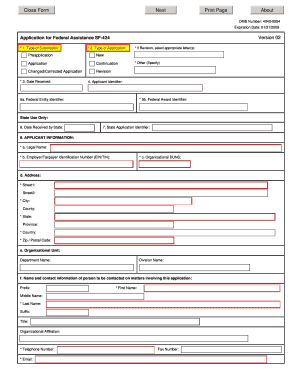
Get Omb Sf-424 2005
How it works
-

Open form follow the instructions
-

Easily sign the form with your finger
-

Send filled & signed form or save
How to fill out the OMB SF-424 online
The OMB SF-424, also known as the application for federal assistance, is a crucial document for applicants seeking federal funding. This guide provides clear, step-by-step instructions to assist users in effectively completing the form online.
Follow the steps to fill out the OMB SF-424 online smoothly.
- Click ‘Get Form’ button to access the form and open it in your browser.
- Begin with section 1, select the type of submission you are making from the provided options. Ensure the correct choice aligns with your application purpose.
- In section 2, indicate the type of application you are submitting, such as preapplication or changed application.
- If your submission requires revision, specify the appropriate letters in the revision section whether your application is new or a revision.
- Complete section 3 by entering the date your application was received. If applicable, provide additional information in the 'Other' field.
- For section 4, provide your applicant identifier, which will be completed by Grants.gov upon submission.
- In section 5, enter the federal entity identifier and the federal award identifier if available.
- Proceed to section 8 and fill out your applicant information, including legal name, EIN/TIN, and organizational DUNS. Complete your address details accurately.
- For section 8f, provide the contact information for the person responsible for matters concerning the application, including their name, title, and contact details.
- Select the type of applicant in section 9. Choose from options provided for types 1, 2, and 3.
- In section 10, specify the name of the federal agency you are applying to.
- Complete section 11 by entering the Catalog of Federal Domestic Assistance number and the corresponding CFDA title.
- Fill out section 12 with the funding opportunity number and title.
- Continue to section 16 to indicate the congressional districts affected by your project.
- In section 17, provide the proposed project start and end dates.
- Section 18 requires you to enter estimated funding amounts from various sources, summing them up in the TOTAL field.
- Confirm if your application is subject to state review under Executive Order 12372 and provide necessary details.
- In section 20, indicate whether the applicant has any outstanding federal debt and provide an explanation if applicable.
- For section 21, certify the application by signing and providing the authorized representative's details, including their contact information.
- Finally, review all entries for accuracy. Save your changes, and you can then choose to download, print, or share the completed form.
Start filling out your OMB SF-424 online today to secure your federal assistance!
Get form
Experience a faster way to fill out and sign forms on the web. Access the most extensive library of templates available.
Related links form
The easiest way to secure a government grant is to carefully research grant opportunities that match your qualifications. Completing the OMB SF-424 form correctly and thoroughly increases your chances of approval. Additionally, leveraging resources like workshops or consultants can enhance your understanding of the process. Being organized and prepared will significantly streamline your application journey.
Get This Form Now!
Use professional pre-built templates to fill in and sign documents online faster. Get access to thousands of forms.
Industry-leading security and compliance
US Legal Forms protects your data by complying with industry-specific security standards.
-
In businnes since 199725+ years providing professional legal documents.
-
Accredited businessGuarantees that a business meets BBB accreditation standards in the US and Canada.
-
Secured by BraintreeValidated Level 1 PCI DSS compliant payment gateway that accepts most major credit and debit card brands from across the globe.