Loading
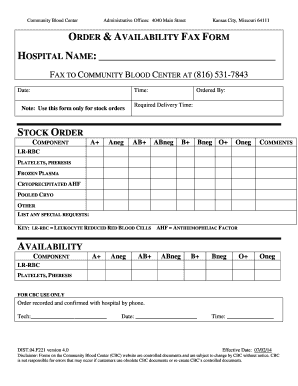
Get Mo Community Blood Center Order & Availability Fax Form 2014
How it works
-

Open form follow the instructions
-

Easily sign the form with your finger
-

Send filled & signed form or save
How to fill out the MO Community Blood Center Order & Availability Fax Form online
Filling out the MO Community Blood Center Order & Availability Fax Form is a crucial step in ensuring timely access to essential blood components. This guide provides clear, step-by-step instructions to assist you in accurately completing the form online.
Follow the steps to complete your order efficiently.
- Click ‘Get Form’ button to obtain the form and open it in the editor.
- Begin by entering the hospital name in the designated field at the top of the form.
- Fill in the date and time of the order to ensure accurate tracking.
- In the 'Ordered By' section, provide the name or title of the person submitting the order.
- Specify the required delivery time to facilitate prompt processing.
- In the stock order section, select the components needed from the listed options, such as A+, O-, platelets, or frozen plasma.
- If there are any comments or special requests, make sure to include them in the comments section.
- For the availability section, you may need to confirm the components listed and their status. Ensure all required fields are filled out properly.
- Once all information is complete, you can save changes, download the form, print it, or share it as necessary.
Complete your documents online for efficient processing.
Get form
Experience a faster way to fill out and sign forms on the web. Access the most extensive library of templates available.
Get This Form Now!
Use professional pre-built templates to fill in and sign documents online faster. Get access to thousands of forms.