Loading
Get Supplier Information
How it works
-

Open form follow the instructions
-

Easily sign the form with your finger
-

Send filled & signed form or save
How to fill out the Supplier Information online
Completing the Supplier Information form accurately is essential for successful vendor registration. This guide provides step-by-step instructions to help you fill out the form with ease, ensuring that all necessary details are submitted correctly.
Follow the steps to successfully complete the Supplier Information form.
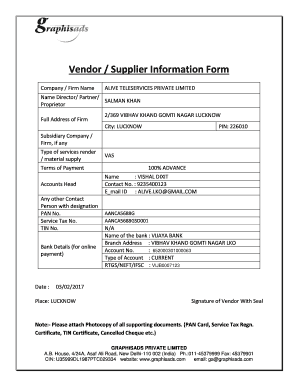
- Click the ‘Get Form’ button to access the Supplier Information form and open it for editing.
- Enter the name of the company or firm in the designated field. Ensure that it matches official documents for consistency.
- Provide the name of the director, partner, or proprietor in the appropriate box.
- Fill in the complete address of the firm, including street, city, and postal code.
- If applicable, list any subsidiary companies related to the main firm.
- Indicate the type of services you provide or the materials you supply.
- Specify your terms of payment clearly to avoid any confusion.
- Select or write down the accounts head related to your transactions.
- Provide details of another contact person, including their designation.
- Enter the PAN number, Service Tax number, and TIN number where indicated.
- Fill out the bank details for online payments, including the bank name, branch address, account number, type of account, and RTGS/NEFT/IFSC details.
- Date the form and indicate the place of signing.
- Ensure to sign the form and affix your seal if necessary.
- Attach photocopies of all required supporting documents such as the PAN card, Service Tax registration certificate, TIN certificate, and a cancelled cheque.
- Once all fields are completed and documents attached, save your changes, and consider downloading, printing, or sharing the form as required.
Complete and submit your Supplier Information form online today!
A supplier information form is used to gather information about suppliers. Whether you're a company owner or a member of the purchasing department, use our online Supplier Information Form template to keep track of the vendors from which you buy materials and products.
Industry-leading security and compliance
US Legal Forms protects your data by complying with industry-specific security standards.
-
In businnes since 199725+ years providing professional legal documents.
-
Accredited businessGuarantees that a business meets BBB accreditation standards in the US and Canada.
-
Secured by BraintreeValidated Level 1 PCI DSS compliant payment gateway that accepts most major credit and debit card brands from across the globe.