Loading
Get Immunization Certificate.pdf - Pdf Archive
How it works
-

Open form follow the instructions
-

Easily sign the form with your finger
-

Send filled & signed form or save
How to fill out the Immunization Certificate.pdf - PDF Archive online
Filling out the Immunization Certificate is an essential step for students to ensure compliance with health regulations. This guide provides clear, step-by-step instructions for completing the form accurately and efficiently, ensuring you provide all necessary information.
Follow the steps to complete the Immunization Certificate effectively.
- Click ‘Get Form’ button to obtain the Immunization Certificate.pdf and open it in your preferred PDF editor.
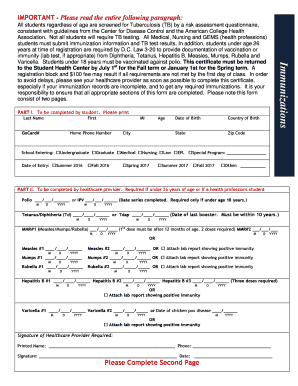
- Begin with Part I, which must be completed by the student. Enter your last name, first name, middle initial, GoCard number, home phone number, age, city, date of birth, country of birth, state, and zip code. Indicate the school you are entering and your date of entry.
- Proceed to Part II, which is to be filled out by your healthcare provider. They will enter the dates for all required vaccinations and whether lab reports demonstrating immunity are attached. Ensure your provider includes their signature and a contact number.
- Move on to Part III, which contains TB questions applicable to all students. Answer the questions carefully, and if you meet the criteria for TB testing, ensure your healthcare provider fills out the necessary information in Part IV.
- In Part IV, if testing is required, your healthcare provider will document the results of PPD testing or other TB-related assessments, including the date and result of any necessary chest x-rays.
- Continue to Part V to indicate the date of your meningitis vaccine or waive the requirement by signing the appropriate section.
- If you are under 18 years of age, Part VI must be completed by your parent or guardian to consent to any necessary medical treatment.
- Part VII allows for requests for exemptions. Indicate if you are seeking a religious or medical exemption and ensure supporting documentation is included.
- Once all sections have been filled out accurately, review the form for completeness. You can then save your changes, download the completed document, print it for physical submission, or share it as required.
Ensure your immunization requirements are met by completing and submitting your Immunization Certificate online today.
You can also print a CIS at home by signing up and logging into MyIR at https://wa.myir.net. If your provider doesn't use the IIS, email or call the Department of Health to get a copy of your child's CIS: waiisrecords@doh.wa.gov or 1-866-397-0337.
Industry-leading security and compliance
US Legal Forms protects your data by complying with industry-specific security standards.
-
In businnes since 199725+ years providing professional legal documents.
-
Accredited businessGuarantees that a business meets BBB accreditation standards in the US and Canada.
-
Secured by BraintreeValidated Level 1 PCI DSS compliant payment gateway that accepts most major credit and debit card brands from across the globe.