Loading
Get Az Tnt Resident Information Update 2021-2026
How it works
-

Open form follow the instructions
-

Easily sign the form with your finger
-

Send filled & signed form or save
How to fill out the AZ TNT Resident Information Update online
This guide provides clear and supportive instructions for completing the AZ TNT Resident Information Update online. The goal is to ensure accurate and up-to-date information for effective communication with your property management.
Follow the steps to complete your resident information update online.
- Press the ‘Get Form’ button to access the form and open it in your editor of choice.
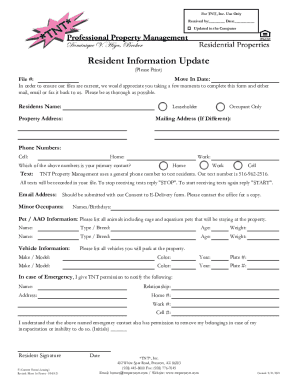
- Begin with entering your resident’s name in the designated field. Ensure that you provide the complete name as it appears on your lease.
- Input the property address where you reside. If you have multiple addresses, make sure to specify the one currently in use.
- Identify your status in the property by selecting either 'Leaseholder' or 'Occupant Only'.
- If your mailing address differs from your property address, enter it in the appropriate section.
- Provide your primary phone numbers, including your cell, home, and work phone numbers. Indicate which number serves as your primary contact.
- In the section for text messages, note your preference on which number you want to receive messages from TNT Property Management.
- Enter your email address. If available, ensure to submit this with the Consent to E-Delivery form by contacting the office.
- List any minor occupants along with their names and birthdays.
- Detail any pets or animals you will have at the property, including their names, types, breeds, ages, and weights.
- Provide information for all vehicles that will be parked at the property, including make, model, color, year, and plate numbers.
- Complete the emergency contact section, providing the name, relationship, address, and phone numbers (home, work, cell) of the individual you choose.
- Initial the section that grants permission for the emergency contact to remove your belongings in case of incapacitation.
- Finally, sign the document and provide the date. Ensure that your signature is clear to validate the form.
- Once all information is entered, review your responses for accuracy. You may then save changes, download, print, or share the completed form as required.
Complete and submit your resident information update online today for a streamlined communication experience.