Loading
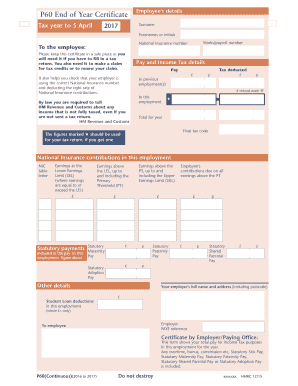
Get Uk Hmrc P60 2017
How it works
-

Open form follow the instructions
-

Easily sign the form with your finger
-

Send filled & signed form or save
How to fill out the UK HMRC P60 online
The UK HMRC P60 is an important document that summarizes your total pay and taxes for the tax year. This guide will provide you with a clear, step-by-step approach to filling out the form online, ensuring you understand each component and its significance.
Follow the steps to complete your P60 form online.
- Click ‘Get Form’ button to obtain the P60 and access it for completion.
- In the 'Employee's details' section, fill out your surname, forenames or initials, works/payroll number, and National Insurance number accurately.
- Keep your certificate in a safe place as it is essential for tax returns and claims for tax credits. Remember that it also serves to verify your National Insurance contributions.
- In the 'Pay and Income Tax details' section, enter your total pay and the tax deducted by your employer. Ensure that these figures correspond to your actual payslips.
- Check the 'In this employment' and 'Previous employment(s)' fields: If you are due a refund for any income tax, mark it as 'R' in the relevant section.
- Verify the tax code reflected on the form. This can affect your tax liabilities and ensure you are on the right tax bracket.
- Document your National Insurance contributions accurately, including the relevant earnings that fall under different thresholds (LEL, PT, UEL).
- Complete any statutory payments received during the year, such as Statutory Maternity Pay or Statutory Paternity Pay, making sure to report actual amounts.
- Review the employer's details provided on the form to ensure correct reporting and reference in case of inquiries.
- After ensuring all fields are accurately filled, save changes, download the completed form, and consider printing or sharing it as needed.
Complete your P60 form online today to ensure your records are accurate and up-to-date.
Get form
Experience a faster way to fill out and sign forms on the web. Access the most extensive library of templates available.
If you do not have a P60 If you cannot get a P60 from your employer, you can either: use your personal tax account to view or print the information that would be on the P60. contact HM Revenue and Customs ( HMRC ) and ask for the information that would be on the P60.
Get This Form Now!
Use professional pre-built templates to fill in and sign documents online faster. Get access to thousands of forms.
Industry-leading security and compliance
US Legal Forms protects your data by complying with industry-specific security standards.
-
In businnes since 199725+ years providing professional legal documents.
-
Accredited businessGuarantees that a business meets BBB accreditation standards in the US and Canada.
-
Secured by BraintreeValidated Level 1 PCI DSS compliant payment gateway that accepts most major credit and debit card brands from across the globe.