Loading
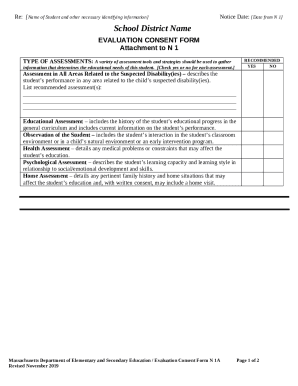
Get Ma Evaluation Consent Form 2019-2025
How it works
-

Open form follow the instructions
-

Easily sign the form with your finger
-

Send filled & signed form or save
How to fill out the MA Evaluation Consent Form online
This guide provides clear, step-by-step instructions for users on filling out the MA Evaluation Consent Form online. It aims to assist individuals in understanding each component of the form, ensuring a smooth and efficient completion process.
Follow the steps to successfully complete the form online:
- Click ‘Get Form’ button to access the MA Evaluation Consent Form and open it in your browser.
- Begin by filling out the identifying information for the student in the designated fields. Ensure that all necessary details are accurately provided.
- Review the section titled 'Type of Assessments.' For each recommended assessment, select 'Yes' or 'No' based on agreement. Provide any additional recommended assessments in the space provided.
- In the 'Parent Response Section,' check at least one box regarding your acceptance or rejection of the proposed evaluation. If you choose to accept in part, clearly list the assessments you agree to.
- If you have requests for further assessments, specify them in the designated area within the form.
- Continue by providing your signature and the date in the 'Signature of Parent, Guardian, Educational Surrogate Parent, Student 18 and Over' section, ensuring all required signatures are included.
- Optionally, provide any input about the student in the 'Parent Input' section by writing a statement or calling the contact person.
- Once all sections are completed, save your changes. You may download, print, or share the form as needed.
Complete the MA Evaluation Consent Form online to ensure a streamlined evaluation process.
Related links form
University Of Missouri Bodywalk Program Guide Sample Proclamation 2001
510(K) Substantial Equivalence Determination Decision Summary Assay And Instrument Combination 2010
Canada Taekwondo Ontario Application For Promotion Test 2009
Evanston Insurance Company Careerguard Federal Employee Professional Liability Insurance 2013
What is a TEAM Evaluation? If you are concerned that your child is having difficulty in school, you can request a TEAM evaluation, sometimes called a “CORE”. A TEAM evaluation is a group of assessments that will help the school district determine whether your child has a disability that requires special education.
Industry-leading security and compliance
US Legal Forms protects your data by complying with industry-specific security standards.
-
In businnes since 199725+ years providing professional legal documents.
-
Accredited businessGuarantees that a business meets BBB accreditation standards in the US and Canada.
-
Secured by BraintreeValidated Level 1 PCI DSS compliant payment gateway that accepts most major credit and debit card brands from across the globe.