Loading
Get Ca Dpa Pathology Visions Registration Form 2018-2026
How it works
-

Open form follow the instructions
-

Easily sign the form with your finger
-

Send filled & signed form or save
How to fill out the CA DPA Pathology Visions Registration Form online
Filling out the CA DPA Pathology Visions Registration Form online is essential for securing your exhibit space. This guide provides you with a clear, step-by-step approach to ensure you complete the form accurately and efficiently.
Follow the steps to complete the registration form online.
- Click ‘Get Form’ button to access the document and open it in your preferred editor.
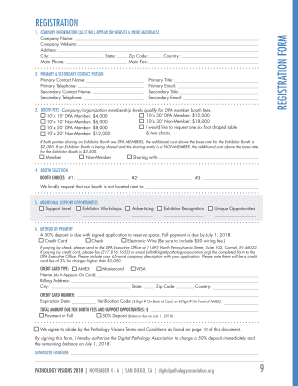
- In the company information section, provide your company name, website, address, city, state, zip code, and main phone number. This information will be displayed on the website and other materials.
- Next, fill out the primary and secondary contact information. Include the names, telephone numbers, titles, and email addresses for both contacts. Ensure the details are accurate as they are essential for communication.
- Proceed to the booth fees section where you need to select the membership level that qualifies your company for DPA member booth fees. Choose your booth size and any additional options such as tables and chairs.
- In the booth selection area, list your top three booth choices and indicate if there is a specific booth you wish to avoid.
- For additional support opportunities, select any options for advertising or workshops you would like to participate in.
- In the method of payment section, choose your payment option, fill out your credit card details, and provide the billing address. Make sure to include a 65-word description of your company with the application.
- After completing all sections, review your information for accuracy. You can then save your changes, and choose to print or download the completed form for your records. Finally, submit the form as per the given instructions.
Complete your registration for Pathology Visions online today!