Loading
Get Ny Ta-w41337 2014-2026
How it works
-

Open form follow the instructions
-

Easily sign the form with your finger
-

Send filled & signed form or save
How to fill out the NY TA-W41337 online
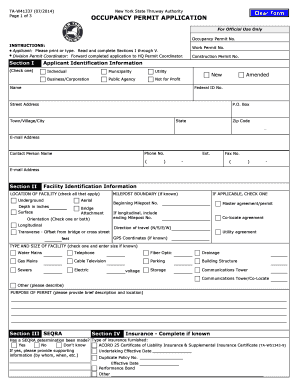
Filling out the NY TA-W41337 form online is an important step for obtaining an occupancy permit from the New York State Thruway Authority. This guide will provide you with clear instructions on completing each section of the form to ensure accurate submission and compliance with requirements.
Follow the steps to complete the NY TA-W41337 form online effectively.
- Press the ‘Get Form’ button to access the NY TA-W41337 form and open it in your online editor.
- Begin by completing Section I, which requires your applicant identification information. Select the appropriate category for your organization, type in the name, and provide the Federal ID number along with the street address, town, state, zip code, email address, phone number, contact person's name, and fax number if applicable.
- Move to Section II to provide facility identification details. Indicate the facility location type (underground, aerial, surface, or bridge) and specify the depth if applicable. If you have milepost boundaries, include the beginning and ending milepost numbers along with the direction of travel and GPS coordinates.
- In Section III, answer the SEQRA question regarding the determination made, and if known, provide details about the type of insurance and pertinent policy information in Section IV.
- Section V requires your affirmation and certification. Read this section carefully before signing. Ensure all information provided is accurate and complete. Enter the date of signing and print your name before signing.
- After completing the form, review all sections for accuracy. You can then save your changes, print a copy for your records, and proceed to submit the form to the appropriate Thruway Authority Division Permit Coordinator as indicated in Section VI.
Complete your NY TA-W41337 form online today to ensure a smooth permit application process.
Related links form
TCO Requirements Temporary or Final Construction inspection sign-off. Temporary or Final Plumbing inspection sign-off. Temporary or Final Electrical inspection sign-off. Temporary Elevator sign-off (if applicable) $100 fee for TCO (unless fee is exempt) An approved Schedule of Occupancy in DOB NOW: Build.
Industry-leading security and compliance
US Legal Forms protects your data by complying with industry-specific security standards.
-
In businnes since 199725+ years providing professional legal documents.
-
Accredited businessGuarantees that a business meets BBB accreditation standards in the US and Canada.
-
Secured by BraintreeValidated Level 1 PCI DSS compliant payment gateway that accepts most major credit and debit card brands from across the globe.