Loading
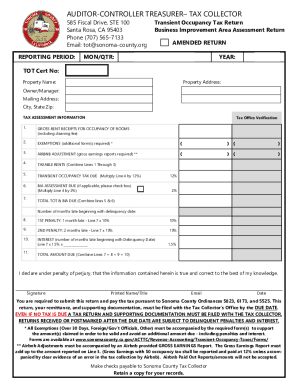
Get Ca Transient Occupancy Tax Return - Sonoma County 2021
How it works
-

Open form follow the instructions
-

Easily sign the form with your finger
-

Send filled & signed form or save
How to fill out the CA Transient Occupancy Tax Return - Sonoma County online
Filing the CA Transient Occupancy Tax Return in Sonoma County is essential for complying with local tax regulations. This guide provides a comprehensive, step-by-step approach to help users navigate the online form effectively.
Follow the steps to complete your tax return online.
- Click ‘Get Form’ button to obtain the form and open it in the editor.
- Enter the reporting period at the top of the form. Specify whether this is for a monthly or quarterly return, and include the month or quarter you are reporting.
- Provide your transient occupancy tax certificate number and the property name where applicable.
- Fill in the property address where the taxable activity occurred, along with the owner's or manager's name and mailing address, including city, state, and ZIP code.
- In the tax assessment information section, report your gross rent receipts for occupancy of rooms in the designated field, including any cleaning fees.
- If applicable, indicate any exemptions and ensure you have the required supporting documentation. Attach additional forms as necessary.
- If you have issued any Airbnb adjustments, report them in the designated field along with any evidence of gross earnings required.
- Calculate the taxable rents by combining the amounts reported on lines for gross rent receipts and exemptions, as applicable.
- Determine the transient occupancy tax due by multiplying the taxable rents by 12%. Provide the calculated amount on the specified line.
- If applicable, check the box for Business Improvement Area (BIA) assessment and calculate the amount due by multiplying the taxable rents by 2%.
- Combine lines from the transient occupancy tax and BIA assessment to determine the total amount due.
- If filing late, calculate any penalties and interests based on the number of months you are late, using the formulas provided in the form.
- Complete the declaration statement certifying the accuracy of the information provided. Ensure you sign and print your name, title, and date.
- Finally, save your changes, download, print, or share your completed form as needed.
Complete your CA Transient Occupancy Tax Return online today to ensure compliance and avoid penalties.
Get form
Experience a faster way to fill out and sign forms on the web. Access the most extensive library of templates available.
*** EFFECTIVE JULY 1, 2021, THE TOT TAX IS 12.5% *** What is it? Transient occupancy tax (TOT), also known as "bed tax", is a voter approved tax collected from lodgers when they rent a motel room, campsite or RV space in the county for 30 days or less.
Get This Form Now!
Use professional pre-built templates to fill in and sign documents online faster. Get access to thousands of forms.