Loading
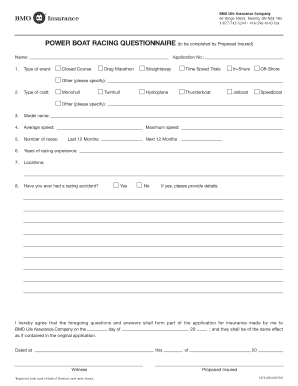
Get Name: Application No.: 1. Type Of Event: Closed Course ... - Bmo.com
How it works
-

Open form follow the instructions
-

Easily sign the form with your finger
-

Send filled & signed form or save
How to fill out the Name: Application No.: 1. Type Of Event: Closed Course ... - BMO.com online
Filling out the Name: Application No.: 1. Type Of Event: Closed Course ... form is a straightforward process that ensures your insurance application is complete and accurate. This guide provides step-by-step instructions to help you navigate each section of the form online.
Follow the steps to complete your application accurately.
- Click the ‘Get Form’ button to access the form and open it in your browser or preferred document editor.
- Begin by entering your full name in the designated 'Name' field. Ensure that the spelling is correct as it will be used for official documentation.
- In the 'Application No.' field, provide the unique application number associated with your application. This number is often found in your correspondence from the insurance provider.
- Select the type of event you are applying for by checking the appropriate box under 'Type of event.' Options include closed course, drag marathon, straightaway, time speed trials, in-shore, off-shore, hydroplane, thunderboat, jetboat, speedboat, or other. If selecting 'other,' be sure to specify.
- In the 'Type of craft' section, choose the category that best describes your racing craft: monohull, twin-hull, or other; provide details if necessary.
- Enter the model name of your craft in the dedicated field; correct spelling is important for insurance purposes.
- Indicate your average speed during races in the 'Average speed' section.
- Record the total number of races you have participated in within the 'Number of races' field.
- Fill in your years of racing experience under 'Years of racing experience.' This helps provide context for your application.
- List the locations where you typically race in the 'Locations' field.
- If you have experienced a racing accident, select 'Yes' and provide details in the appropriate section. If not, choose 'No.' Ensure to report any maximum speed records for both the last and next 12 months.
- At the bottom of the form, review the agreement statement. Confirm your consent by entering the date in the provided space, ensuring accuracy in the 'dated at' and 'this' fields.
- Once all fields are filled, you may save changes to your document, download it for your records, or print and share it as needed.
Complete your insurance application online now to ensure your coverage is in place.
Industry-leading security and compliance
US Legal Forms protects your data by complying with industry-specific security standards.
-
In businnes since 199725+ years providing professional legal documents.
-
Accredited businessGuarantees that a business meets BBB accreditation standards in the US and Canada.
-
Secured by BraintreeValidated Level 1 PCI DSS compliant payment gateway that accepts most major credit and debit card brands from across the globe.