Loading
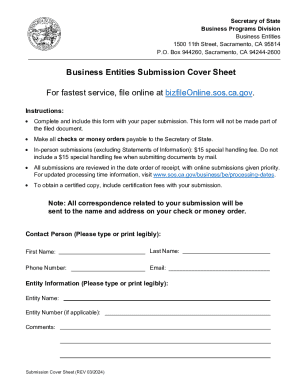
Get Ca Arts-pb- 501(c)(3) 2024-2026
How it works
-

Open form follow the instructions
-

Easily sign the form with your finger
-

Send filled & signed form or save
How to fill out the CA ARTS-PB-501(c)(3) online
Filing the CA ARTS-PB-501(c)(3) is an essential step in establishing a nonprofit public benefit corporation in California. This guide provides clear and supportive instructions for effectively completing the form online, ensuring you meet all requirements for tax-exempt status.
Follow the steps to complete the CA ARTS-PB-501(c)(3) form online.
- Press the ‘Get Form’ button to access the CA ARTS-PB-501(c)(3) document and open it in the online editor.
- In Item 1, enter the proposed name of the corporation as it will appear on records. Ensure compliance with legal naming conventions, which can be checked online.
- For Item 2a, provide the complete street address of the corporation’s initial address, ensuring it is a physical address and not a P.O. Box.
- If the corporation has a different mailing address than in Item 2a, complete Item 2b with that address, which may include a P.O. Box.
- Complete Item 3 by designating an Agent for Service of Process. Choose between describing an individual agent's full name and California address (3a and 3b) or provide the name of a registered corporate agent (3c).
- In Item 4, check one or both boxes for the purpose of the organization and provide a specific purpose statement in 4b if applicable.
- Fill out Items 5a to 5d, which contain essential statements regarding organization and operations for tax-exempt status. Ensure that these statements are not altered.
- Each incorporator must sign the form in Item 6. If more space is needed, attach additional signed pages clearly marked.
- After completing the form, you may save your changes, download, print, or share the document as needed.
Complete your CA ARTS-PB-501(c)(3) form online today and take a significant step toward establishing your nonprofit.
Determine the name of the corporation. Draft and file the articles of incorporation. Appoint the board of directors. Draft the bylaws and conflict of interest policy. Take the initial board actions. Obtain an employer identification number (EIN)
Industry-leading security and compliance
US Legal Forms protects your data by complying with industry-specific security standards.
-
In businnes since 199725+ years providing professional legal documents.
-
Accredited businessGuarantees that a business meets BBB accreditation standards in the US and Canada.
-
Secured by BraintreeValidated Level 1 PCI DSS compliant payment gateway that accepts most major credit and debit card brands from across the globe.