Loading
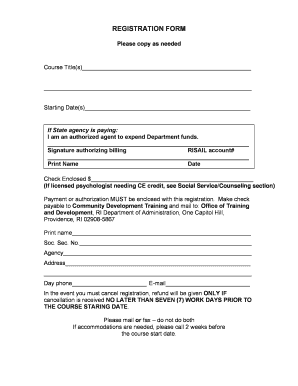
Get Course Title(s)
How it works
-

Open form follow the instructions
-

Easily sign the form with your finger
-

Send filled & signed form or save
How to fill out the Course Title(s) online
This guide provides clear instructions for filling out the Course Title(s) registration form online. By following the outlined steps, users will be able to complete the form accurately and efficiently.
Follow the steps to fill out the Course Title(s) registration form online.
- Click 'Get Form' button to obtain the form and open it in an online editing tool.
- Begin by filling in the Course Title(s) field with the appropriate course information. It is important to be clear and concise when stating the title of the course you wish to register for.
- Next, indicate the Starting Date(s) by providing the date or dates when the course will begin. Ensure the format is correct and that you include all relevant dates if multiple sessions apply.
- If a state agency is funding your participation, select the option stating you are an authorized agent to expend Department funds. You must then provide the signature authorizing billing alongside the RISAIL account number.
- Print your name and date in the designated fields to verify your identity and agreement. Make sure that this information matches your official records.
- Enter your check amount in the field provided, ensuring that your payment, or authorization for payment if applicable, is enclosed with the registration form.
- Complete the personal information section, including your Social Security Number, agency name, address, and contact details such as your day phone number and email address.
- Review the cancellation policy and note that refunds will only be granted if cancellations are communicated no later than seven workdays before the course's starting date.
- Finally, save your changes, download the completed form, and print or share it as required for submission. Ensure it is sent to the specified address carefully.
Complete your Course Title(s) registration form online today to ensure your spot in the desired course.
Industry-leading security and compliance
US Legal Forms protects your data by complying with industry-specific security standards.
-
In businnes since 199725+ years providing professional legal documents.
-
Accredited businessGuarantees that a business meets BBB accreditation standards in the US and Canada.
-
Secured by BraintreeValidated Level 1 PCI DSS compliant payment gateway that accepts most major credit and debit card brands from across the globe.