Loading
Form preview
  • US Legal Forms
  • Form Library
  • Industry Forms
  • Industry Employment Forms
  • Carechoice Timesheet

Get Carechoice Timesheet

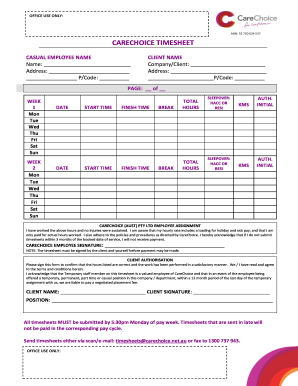
OFFICE USE ONLY: ABN: 32 730 624 537 CARECHOICE TIMESHEET CASUAL EMPLOYEE NAME Name: Address: P/Code: CLIENT NAME Company/Client: Address: P/Code: PAGE: of WEEK 1 Mon Tue Wed Thu Fri Sat Sun WEEK.

How it works

  1. Open form

    Open form follow the instructions

  2. Easily sign form

    Easily sign the form with your finger

  3. Share form

    Send filled & signed form or save

How to fill out the CareChoice Timesheet online

Filling out the CareChoice Timesheet online is an essential step for casual employees to ensure accurate record-keeping of hours worked. This guide provides easy-to-follow steps for completing the form accurately and efficiently.

Follow the steps to complete the CareChoice Timesheet online

  1. Click ‘Get Form’ button to obtain the form and open it in the editor.
  2. Begin by entering your name and address in the designated fields for casual employee details. Ensure your details are accurate.
  3. In the client section, fill in the client or company name along with their address. This information is crucial for identifying the service recipient.
  4. Next, indicate the week number and fill out the days of the week. Mark each day worked with the corresponding dates.
  5. For each day worked, record your start time and finish time, along with any break taken. Be meticulous to ensure the accuracy of hours.
  6. Calculate and enter the total hours worked for each day in the total hours section for both week 1 and week 2.
  7. If applicable, indicate if there was a sleepover by marking HACC or RESI next to the relevant days.
  8. Complete the kilometers traveled by inputting the number in the KMS field, and ensure to have it authorized via the initials field.
  9. After filling in all necessary fields, sign the timesheet to confirm that the hours worked are accurate and that you have not sustained any injuries.
  10. The client must also sign the timesheet to authorize the hours, confirming that the work was performed satisfactorily.
  11. Submit the completed timesheet before the deadline of 5:30 pm on Monday of pay week via scan/email or fax to ensure timely payment.

Begin completing the CareChoice Timesheet online to ensure you receive accurate compensation for your hours worked.

Get form

Experience a faster way to fill out and sign forms on the web. Access the most extensive library of templates available.
Get form

Related content

Consumer Choice Option (CCO) | Health & Human...
The Consumer Choice Option (CCO) gives members control over Medicaid dollars to meet their...
Learn more
Application for a §1915 (c) HCBS Waiver
The application being used is a new format that requires an increased level of detail that...
Learn more

Related links form

Blank G 37 Frm Phillips Edison-ARC Shopping Center REIT Inc. Transfer ... Form 8875 Online Typeable Applications For Mcdonalds Form

Questions & Answers

Get answers to your most pressing questions about US Legal Forms API.

Contact support

Viewing your Workday timesheet is straightforward. Log in to your Workday account and head over to the time tracking section. This will allow you to access your CareChoice Timesheet details, enabling you to see all the hours recorded and submitted for payment.

The Time4Care app streamlines the process of tracking work hours and submitting timesheets. Once you install the app, you can log your hours easily and submit a CareChoice Timesheet on-the-go. This user-friendly application also allows you to monitor approvals, making time management effortless.

To submit a timesheet to Deltek, access your Deltek account and navigate to the timesheet submission page. Enter your worked hours accurately, following the required format of your CareChoice Timesheet. Finally, confirm that all entries are correct before submitting for approval, ensuring a smooth payment process.

Recording a timesheet involves documenting the hours and activities related to your work. You can easily fill out a CareChoice Timesheet by noting the start and end times of your shifts along with any breaks. Regularly updating your timesheet keeps your records accurate and assists in timely payroll processing.

Submitting a timesheet on the Time4Care app is easy. After logging in, go to your timesheet area and enter your hours worked. Make sure to double-check the details, as accuracy is crucial, then click on submit. This process ensures your CareChoice Timesheet is processed without delays.

Timesheet hours refer to the total hours worked by an employee within a specific period. These hours are typically recorded on a timesheet, such as a CareChoice Timesheet, to ensure accurate payment processing. By tracking timesheet hours, both employees and employers can maintain transparency and accountability.

To enter 30 minutes in the CareChoice Timesheet, simply write .50 in the corresponding time cell. This will accurately communicate the duration of your work. By doing so, you maintain transparency and precision in your reporting process.

Yes, .50 on a timesheet equals 30 minutes. When you use the CareChoice Timesheet, entering .50 accurately reflects half an hour of work. This clarity allows both you and your employer to manage time efficiently and avoid confusion.

.25 on a timesheet represents a quarter of an hour, which equals 15 minutes. When using the CareChoice Timesheet, you can break down your hours into decimal format for easier calculations. This helps in tracking shorter intervals worked within a day, ensuring precise reporting.

To calculate timesheet hours, subtract the start time from the end time. For instance, if you worked from 9 AM to 5 PM, you would calculate 8 hours. Using the CareChoice Timesheet can help automate this process, making it more efficient.

Get This Form Now!

Use professional pre-built templates to fill in and sign documents online faster. Get access to thousands of forms.
Get form
If you believe that this page should be taken down, please follow our DMCA take down processhere.

Industry-leading security and compliance

US Legal Forms protects your data by complying with industry-specific security standards.
  • In businnes since 1997
    25+ years providing professional legal documents.
  • Accredited business
    Guarantees that a business meets BBB accreditation standards in the US and Canada.
  • Secured by Braintree
    Validated Level 1 PCI DSS compliant payment gateway that accepts most major credit and debit card brands from across the globe.
Get CareChoice Timesheet
Get form
Form Packages
Adoption
Bankruptcy
Contractors
Divorce
Home Sales
Employment
Identity Theft
Incorporation
Landlord Tenant
Living Trust
Name Change
Personal Planning
Small Business
Wills & Estates
Packages A-Z
Form Categories
Affidavits
Bankruptcy
Bill of Sale
Corporate - LLC
Divorce
Employment
Identity Theft
Internet Technology
Landlord Tenant
Living Wills
Name Change
Power of Attorney
Real Estate
Small Estates
Wills
All Forms
Forms A-Z
Form Library
Customer Service
Your Privacy Choices
Terms of Service
Privacy Notice
Legal Hub
Content Takedown Policy
Bug Bounty Program
About Us
Help Portal
Legal Resources
Blog
Affiliates
Contact Us
Delete My Account
Site Map
Industries
Forms in Spanish
Localized Forms
State-specific Forms
Forms Kit
Legal Guides
Real Estate Handbook
All Guides
Prepared for You
Notarize
Incorporation services
Our Customers
For Consumers
For Small Business
For Attorneys
Our Sites
US Legal Forms
USLegal
FormsPass
pdfFiller
signNow
altaFlow
DocHub
Instapage
Social Media
Call us now toll free:
+1 833 426 79 33
As seen in:
  • USA Today logo picture
  • CBC News logo picture
  • LA Times logo picture
  • The Washington Post logo picture
  • AP logo picture
  • Forbes logo picture
© Copyright 1997-2025
airSlate Legal Forms, Inc.
3720 Flowood Dr, Flowood, Mississippi 39232
Form Packages
Adoption
Bankruptcy
Contractors
Divorce
Home Sales
Employment
Identity Theft
Incorporation
Landlord Tenant
Living Trust
Name Change
Personal Planning
Small Business
Wills & Estates
Packages A-Z
Form Categories
Affidavits
Bankruptcy
Bill of Sale
Corporate - LLC
Divorce
Employment
Identity Theft
Internet Technology
Landlord Tenant
Living Wills
Name Change
Power of Attorney
Real Estate
Small Estates
Wills
All Forms
Forms A-Z
Form Library
Customer Service
Your Privacy Choices
Terms of Service
Privacy Notice
Legal Hub
Content Takedown Policy
Bug Bounty Program
About Us
Help Portal
Legal Resources
Blog
Affiliates
Contact Us
Delete My Account
Site Map
Industries
Forms in Spanish
Localized Forms
State-specific Forms
Forms Kit
Legal Guides
Real Estate Handbook
All Guides
Prepared for You
Notarize
Incorporation services
Our Customers
For Consumers
For Small Business
For Attorneys
Our Sites
US Legal Forms
USLegal
FormsPass
pdfFiller
signNow
altaFlow
DocHub
Instapage
Social Media
Call us now toll free:
+1 833 426 79 33
As seen in:
  • USA Today logo picture
  • CBC News logo picture
  • LA Times logo picture
  • The Washington Post logo picture
  • AP logo picture
  • Forbes logo picture
© Copyright 1997-2025
airSlate Legal Forms, Inc.
3720 Flowood Dr, Flowood, Mississippi 39232