Loading
Form preview
  • US Legal Forms
  • Form Library
  • More Forms
  • More Multi-State Forms
  • (sf)

Get (sf)

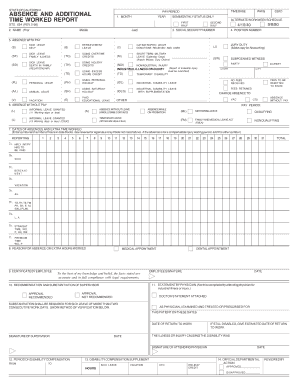
UAL LEAVE (V) VACATION (B) BEREAVEMENT LEAVE (TO) USING OVERTIME CREDITS (TH) USING HOLIDAY CREDITS (TE) USING EXCESS HOURS CREDIT (PH) USING PERSONAL HOLIDAY (SH) USING SATURDAY HOLIDAY (E) PAID EDUCATIONAL LEAVE SECOND HALF (C) CATASTROPHIC LEAVE DONATIONS RECEIVED AND USED (M) SHORT-TERM MILITARY LEAVE (Calendar Days) (Attach Military Duty Orders) (NDI) NONINDUSTRIAL INJURY (Report of Industrial Injury INDUSTRIAL ILLNESS OR INJURY (TD) must be submitted) TEMPORARY DISAB.

How it works

  1. Open form

    Open form follow the instructions

  2. Easily sign form

    Easily sign the form with your finger

  3. Share form

    Send filled & signed form or save

How to fill out the (SF) online

This guide provides a comprehensive overview of the steps necessary to accurately complete the Absence and Additional Time Worked Report (SF) online. Whether you are new to this process or seeking to refine your skills, these instructions are designed to assist you in every aspect of filling out the form.

Follow the steps to successfully complete the (SF) online.

  1. Press the ‘Get Form’ button to access the form and open it in your chosen digital editor.
  2. Begin by entering the pay period, month, and year in the designated fields, as required by your department.
  3. Input your name, social security number, and position number into the respective boxes.
  4. Indicate any absences with pay by checking the appropriate box for each type of absence you are reporting.
  5. For any absences without pay, fill out the required sections by specifying the type of unpaid absence. Determine if the current pay period qualifies or not based on your paid days worked.
  6. In the Dates of Absences and Extra Time Worked section, enter the appropriate symbol and number of hours for each type of absence reported.
  7. Provide a reason for each absence or any extra hours worked in the specified section, ensuring you provide necessary details and context.
  8. Complete the Employee Certification by signing and dating the box where indicated, confirming the accuracy of the information provided.
  9. If applicable, ensure any required physician's statements or recommendations are attached and noted.
  10. Once all sections are filled out, review your input for accuracy and completeness. Save your changes, then download, print, or share the completed form as needed.

Start filling out your (SF) form online today for a smoother reporting process.

Get form

Experience a faster way to fill out and sign forms on the web. Access the most extensive library of templates available.
Get form

Related content

Standard Forms
Standard Forms are used governmentwide for various employment and benefits program...
Learn more
Standard Form 86 - Questionnaire for National...
This form will be used by the United States (U.S.) Government in conducting background...
Learn more
Standard Form 50 (SF-50) Notification of Personnel...
The SF-50s in the eOPF are used to document appointments, to verify benefits and...
Learn more

Related links form

Federal Form 4506-T (Request For Transcript Of Tax Return ... CORE Phonics Survey Record Sheet.xlsx FSSD Zoom Permission Slip.docx Trumbull Ct Assessor

Questions & Answers

Get answers to your most pressing questions about US Legal Forms API.

Contact support

San Francisco, often referred to as SF, is located in California. This is one of the most populous states in the U.S., known for its diverse communities and landmarks. If you are looking to explore legal forms or services in SF, the US Legal Forms platform provides comprehensive resources and solutions tailored to the needs of residents and businesses in this bustling city.

While SF is primarily recognized as an abbreviation for San Francisco, it does not stand for a specific state, but rather represents a city in California. This connection highlights the city's importance within the state and its recognition as a vibrant metropolis. SF serves as a major cultural and economic hub in the region.

SF is situated in the state of California, known for its beautiful coastlines and diverse geography. California offers a mix of urban and natural attractions that enhance SF's charm. The state is also recognized for its contributions to technology, entertainment, and agriculture, making it a dynamic place to live or visit.

The abbreviation SF stands for San Francisco, a city that derives its name from the Spanish Mission San Francisco de Asís. This name reflects the city's rich history and cultural roots. Over the years, SF has become synonymous with progress, creativity, and open-mindedness, highlighting its appeal to both locals and visitors.

SF is famous for its diverse culture, innovative technology scene, and stunning attractions. Visitors flock to explore places like Fisherman's Wharf, the Painted Ladies, and vibrant neighborhoods like Chinatown. Additionally, SF plays a significant role in the tech industry, being home to many tech startups and established companies.

SF is an abbreviation for San Francisco, a vibrant city located on the west coast of the United States. Known for its iconic landmarks, such as the Golden Gate Bridge and Alcatraz Island, SF offers a unique blend of culture and scenery. Whether you are looking for tech hubs, beautiful parks, or waterfront views, SF has something for everyone.

The responsibility for submitting the SF 425 typically falls on the organization or individual that received the grant. This submission should be made to the grantor agency as part of the financial reporting process. For help navigating the submission process, you can find resources and guidance on the US Legal Forms platform.

Any entity or individual that receives federal grant funds is required to file the SF-425. This includes non-profit organizations, state agencies, and other entities involved in federal projects or programs. Ensuring accurate and timely submission of the SF-425 helps maintain eligibility for future funding.

Form 425 is primarily used to provide a clear and concise summary of the financial activity associated with federal grants. This form helps ensure that funds are spent according to the grant agreements, and it serves as a tool for accountability. Accurately completing Form 425 can prevent potential compliance issues in the future.

The SF-425 form is typically completed by the recipient of the federal grant, which can be organizations or individuals responsible for managing grant funds. It is crucial that those involved in financial reporting and grant management familiarize themselves with this form and its requirements. If you need assistance with completing the SF-425, the US Legal Forms platform can provide useful resources.

Get This Form Now!

Use professional pre-built templates to fill in and sign documents online faster. Get access to thousands of forms.
Get form
If you believe that this page should be taken down, please follow our DMCA take down processhere.

Industry-leading security and compliance

US Legal Forms protects your data by complying with industry-specific security standards.
  • In businnes since 1997
    25+ years providing professional legal documents.
  • Accredited business
    Guarantees that a business meets BBB accreditation standards in the US and Canada.
  • Secured by Braintree
    Validated Level 1 PCI DSS compliant payment gateway that accepts most major credit and debit card brands from across the globe.
Get (SF)
Get form
Form Packages
Adoption
Bankruptcy
Contractors
Divorce
Home Sales
Employment
Identity Theft
Incorporation
Landlord Tenant
Living Trust
Name Change
Personal Planning
Small Business
Wills & Estates
Packages A-Z
Form Categories
Affidavits
Bankruptcy
Bill of Sale
Corporate - LLC
Divorce
Employment
Identity Theft
Internet Technology
Landlord Tenant
Living Wills
Name Change
Power of Attorney
Real Estate
Small Estates
Wills
All Forms
Forms A-Z
Form Library
Customer Service
Your Privacy Choices
Terms of Service
Privacy Notice
Legal Hub
Content Takedown Policy
Bug Bounty Program
About Us
Help Portal
Legal Resources
Blog
Affiliates
Contact Us
Delete My Account
Site Map
Industries
Forms in Spanish
Localized Forms
State-specific Forms
Forms Kit
Legal Guides
Real Estate Handbook
All Guides
Prepared for You
Notarize
Incorporation services
Our Customers
For Consumers
For Small Business
For Attorneys
Our Sites
US Legal Forms
USLegal
FormsPass
pdfFiller
signNow
altaFlow
DocHub
Instapage
Social Media
Call us now toll free:
+1 833 426 79 33
As seen in:
  • USA Today logo picture
  • CBC News logo picture
  • LA Times logo picture
  • The Washington Post logo picture
  • AP logo picture
  • Forbes logo picture
© Copyright 1997-2025
airSlate Legal Forms, Inc.
3720 Flowood Dr, Flowood, Mississippi 39232
Form Packages
Adoption
Bankruptcy
Contractors
Divorce
Home Sales
Employment
Identity Theft
Incorporation
Landlord Tenant
Living Trust
Name Change
Personal Planning
Small Business
Wills & Estates
Packages A-Z
Form Categories
Affidavits
Bankruptcy
Bill of Sale
Corporate - LLC
Divorce
Employment
Identity Theft
Internet Technology
Landlord Tenant
Living Wills
Name Change
Power of Attorney
Real Estate
Small Estates
Wills
All Forms
Forms A-Z
Form Library
Customer Service
Your Privacy Choices
Terms of Service
Privacy Notice
Legal Hub
Content Takedown Policy
Bug Bounty Program
About Us
Help Portal
Legal Resources
Blog
Affiliates
Contact Us
Delete My Account
Site Map
Industries
Forms in Spanish
Localized Forms
State-specific Forms
Forms Kit
Legal Guides
Real Estate Handbook
All Guides
Prepared for You
Notarize
Incorporation services
Our Customers
For Consumers
For Small Business
For Attorneys
Our Sites
US Legal Forms
USLegal
FormsPass
pdfFiller
signNow
altaFlow
DocHub
Instapage
Social Media
Call us now toll free:
+1 833 426 79 33
As seen in:
  • USA Today logo picture
  • CBC News logo picture
  • LA Times logo picture
  • The Washington Post logo picture
  • AP logo picture
  • Forbes logo picture
© Copyright 1997-2025
airSlate Legal Forms, Inc.
3720 Flowood Dr, Flowood, Mississippi 39232