Loading
Form preview
  • US Legal Forms
  • Form Library
  • Industry Forms
  • Industry Insurance & Medical Forms
  • Altus Dental Enrollment Form 2012

Get Altus Dental Enrollment Form 2012-2026

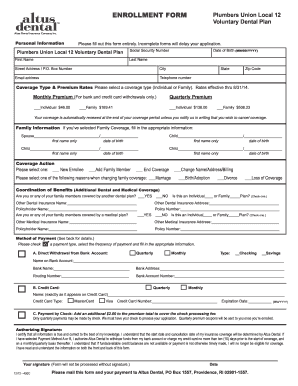
ENROLLMENT FORM Personal Information Plumbers Union Local 12 Retiree Dental Plan Please fill out this form entirely. Incomplete forms will delay your application. Social Security Number Date of Birth.

How it works

  1. Open form

    Open form follow the instructions

  2. Easily sign form

    Easily sign the form with your finger

  3. Share form

    Send filled & signed form or save

How to fill out the Altus Dental Enrollment Form online

This guide provides a step-by-step approach to completing the Altus Dental Enrollment Form online. Whether you are enrolling for yourself or adding family members, this comprehensive outline will assist you in providing the necessary information accurately.

Follow the steps to complete the enrollment form effortlessly.

  1. Press the ‘Get Form’ button to retrieve the Altus Dental Enrollment Form and open it in your preferred editor.
  2. Begin by filling out your personal information in the designated fields. Ensure you provide your date of birth in the MM/DD/YYYY format, full name, and contact details, including your street address, city, state, zip code, email address, and telephone number.
  3. Choose the coverage type by indicating either ‘Individual’ or ‘Family’. Review the corresponding premium rates that are applicable for your selection.
  4. If you selected Family Coverage, complete the Family Information section by filling in the first names and dates of birth for each family member you wish to enroll.
  5. In the Coverage Action section, select your desired option: ‘New Enrollee’, ‘Add Family Member’, or ‘End Coverage’. Specify the reason for any changes in coverage if applicable.
  6. Proceed to the Coordination of Benefits section. Indicate whether you or any family members have additional dental or medical coverage. Fill in the details for any other dental or medical plans, including the policyholder's name and address.
  7. Select your preferred method of payment by checking one of the available options. Fill in the required bank or credit card information, ensuring that all details are accurate, including the frequency of payment.
  8. Review the authorizing statement and provide your signature along with the date. Remember, the form will not be processed without authorization.
  9. Once completed, you can save your changes, download a copy for your records, print the form, or share it as needed. Ensure you mail the form and payment to Altus Dental as instructed.

Get started with your Altus Dental Enrollment Form today and ensure you have the coverage you need.

Get form

Experience a faster way to fill out and sign forms on the web. Access the most extensive library of templates available.
Get form

Related content

Altus Dental Enrollment Form
To be completed by Human Resources or Benefit Administrator. Group No. Dental Division No...
Learn more
ENROLLMENT FORM
Please mail this form to Delta Dental of Rhode Island, P.O. Box 1517, Providence, RI...
Learn more

Related links form

Okdhs Form Abcdm 83 Form Emedny Form 361501 Nys Medical Form No No Download Needed Needed Annexure XIX Application For Building Completion Certificate And ... - Midcindia

Questions & Answers

Get answers to your most pressing questions about US Legal Forms API.

Contact support

The main difference between PPO and EPO dental plans revolves around network restrictions. PPOs offer more flexibility with providers but may have higher costs, while EPOs usually have lower fees but require you to see in-network dentists. When deciding which plan to enroll in, use the Altus Dental Enrollment Form to explore your options.

Dental Select primarily operates as a PPO. This plan allows you to visit any dentist, but you will save more by seeing in-network providers. For those interested in signing up, the Altus Dental Enrollment Form can facilitate your enrollment seamlessly.

A dental expense claim form is a document used to request reimbursement for dental services. Patients complete this form and submit it to their insurance provider after receiving treatment. Make sure to have the Altus Dental Enrollment Form handy for easy access to your insurance details.

Choosing between a dental PPO and a DMO depends on your needs. A dental PPO offers more flexibility in choosing your dentist, while a DMO typically has lower premiums but limits your choices. By using the Altus Dental Enrollment Form, you can compare plans and select the one that best fits your lifestyle.

Yes, Altus Dental offers a PPO option that allows you to choose from a wide network of dentists. With this plan, you can receive care from in-network providers at reduced costs. Using the Altus Dental Enrollment Form can help you easily enroll and start enjoying these benefits.

You may find it challenging to add dental insurance after the open enrollment period. Typically, you must wait until the next enrollment period unless you experience a qualifying life event. If you need immediate access to dental coverage, consider using the Altus Dental Enrollment Form during the next enrollment phase.

To find out your dental insurance provider, check any insurance cards you may have received or the documentation related to your health benefits. Alternatively, you can contact your employer’s HR department or the insurance company directly. If you need to enroll, completing the Altus Dental Enrollment Form on the US Legal Forms platform can also help guide you.

To enroll in Blue Cross Blue Shield dental, you typically need to complete an enrollment form or online application. Start by visiting their website or consulting your employer's benefits department to gather necessary information. By using the Altus Dental Enrollment Form, you can make this process more manageable as you secure your dental insurance.

In some cases, you can obtain dental insurance that offers immediate access to benefits. This feature can help you address urgent dental needs without extended waiting periods. By filling out the Altus Dental Enrollment Form, you can explore immediate coverage options available to you.

Certain dental insurance plans may offer immediate coverage without a waiting period, allowing you to access dental services right away. While specifics can vary, it is essential to review the plan details before enrolling. If you choose the Altus Dental Enrollment Form, you can inquire about plans that do not impose a waiting period while facilitating your enrollment.

Get This Form Now!

Use professional pre-built templates to fill in and sign documents online faster. Get access to thousands of forms.
Get form
If you believe that this page should be taken down, please follow our DMCA take down processhere.

Industry-leading security and compliance

US Legal Forms protects your data by complying with industry-specific security standards.
  • In businnes since 1997
    25+ years providing professional legal documents.
  • Accredited business
    Guarantees that a business meets BBB accreditation standards in the US and Canada.
  • Secured by Braintree
    Validated Level 1 PCI DSS compliant payment gateway that accepts most major credit and debit card brands from across the globe.
Get Altus Dental Enrollment Form
Get form
  • Adoption
  • Bankruptcy
  • Contractors
  • Divorce
  • Home Sales
  • Employment
  • Identity Theft
  • Incorporation
  • Landlord Tenant
  • Living Trust
  • Name Change
  • Personal Planning
  • Small Business
  • Wills & Estates
  • Packages A-Z
  • Affidavits
  • Bankruptcy
  • Bill of Sale
  • Corporate - LLC
  • Divorce
  • Employment
  • Identity Theft
  • Internet Technology
  • Landlord Tenant
  • Living Wills
  • Name Change
  • Power of Attorney
  • Real Estate
  • Small Estates
  • Wills
  • All Forms
  • Forms A-Z
  • Form Library
  • Legal Hub
  • About Us
  • Help Portal
  • Legal Resources
  • Blog
  • Affiliates
  • Contact Us
  • Delete My Account
  • Site Map
  • Industries
  • Forms in Spanish
  • Localized Forms
  • State-specific Forms
  • Forms Kit
  • Real Estate Handbook
  • All Guides
  • Notarize
  • Incorporation services
  • For Consumers
  • For Small Business
  • For Attorneys
  • USLegal
  • FormsPass
  • pdfFiller
  • signNow
  • altaFlow
  • DocHub
  • Instapage
Form Packages
  • Adoption
  • Bankruptcy
  • Contractors
  • Divorce
  • Home Sales
  • Employment
  • Identity Theft
  • Incorporation
  • Landlord Tenant
  • Living Trust
  • Name Change
  • Personal Planning
  • Small Business
  • Wills & Estates
  • Packages A-Z
Form Categories
  • Affidavits
  • Bankruptcy
  • Bill of Sale
  • Corporate - LLC
  • Divorce
  • Employment
  • Identity Theft
  • Internet Technology
  • Landlord Tenant
  • Living Wills
  • Name Change
  • Power of Attorney
  • Real Estate
  • Small Estates
  • Wills
  • All Forms
  • Forms A-Z
  • Form Library
Customer Service
  • Legal Hub
  • About Us
  • Help Portal
  • Legal Resources
  • Blog
  • Affiliates
  • Contact Us
  • Delete My Account
  • Site Map
  • Industries
  • Forms in Spanish
  • Localized Forms
  • State-specific Forms
  • Forms Kit
Legal Guides
  • Real Estate Handbook
  • All Guides
Prepared for you
  • Notarize
  • Incorporation services
Our Customers
  • For Consumers
  • For Small Business
  • For Attorneys
Our Sites
  • USLegal
  • FormsPass
  • pdfFiller
  • signNow
  • altaFlow
  • DocHub
  • Instapage
Social Media
Call us now toll free:
+1 833 426 79 33
As seen in:
© Copyright 1999-2026 airSlate Legal Forms, Inc. 3720 Flowood Dr, Flowood, Mississippi 39232
  • Your Privacy Choices
  • Terms of Service
  • Privacy Notice
  • Content Takedown Policy
  • Bug Bounty Program