Get Au Western Union Telegraphic Transfers Order Form
How it works
-

Open form follow the instructions
-

Easily sign the form with your finger
-

Send filled & signed form or save
How to fill out the AU Western Union Telegraphic Transfers Order Form online
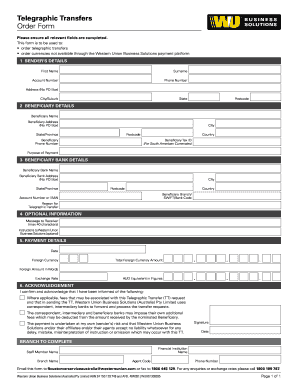
Filling out the AU Western Union Telegraphic Transfers Order Form online allows you to initiate a telegraphic transfer with ease. This guide provides detailed instructions on completing the form accurately and efficiently, ensuring that your transfer process is smooth and straightforward.
Follow the steps to successfully complete the form online:
- To begin, locate and press the ‘Get Form’ button to access the AU Western Union Telegraphic Transfers Order Form in your browser.
- In the first section, 'Sender’s Details', enter your first name, surname, account number, phone number, and physical address. Ensure you omit PO Box addresses and include your city/suburb, state, and postcode correctly.
- Next, move to the 'Beneficiary Details' section. Provide the beneficiary's name, physical address (no PO Box), city, state/province, postcode, phone number, country, and if applicable, tax ID for South American currencies. Also, state the purpose of the payment clearly.
- For the 'Beneficiary Bank Details', fill in the beneficiary bank's name and physical address, excluding PO Box information, and include city, state/province, postcode, and country. Enter the branch, SWIFT/bank code, and the beneficiary's account number or IBAN. Finally, specify the reason for the telegraphic transfer.
- In the 'Optional Information' section, you may leave a message to the receiver (maximum 40 characters) and provide any additional instructions for Western Union Business Solutions if necessary.
- Complete the 'Payment Details' by indicating the date, the foreign currency, and the total amount in foreign currency. Provide the AUD equivalent both in figures and in words, including the exchange rate applied to your transaction.
- In the 'Acknowledgement' section, read the statements carefully. Confirm your understanding by signing and dating the form, acknowledging the associated fees and risks.
- Lastly, if your form is complete, you can save changes, download, print, or share the form as needed.
Begin filling out your AU Western Union Telegraphic Transfers Order Form online today!
When using the AU Western Union Telegraphic Transfers Order Form, acceptable forms of ID include a valid passport, a state-issued driver's license, or a military ID. These IDs must clearly display your photo and name to verify your identity. Be sure that your identification is current and valid to avoid delays in your transfer process. Check the requirements beforehand to ensure a smooth transaction.