Loading
Get Ca Cdcr 7385 2019-2025
How it works
-

Open form follow the instructions
-

Easily sign the form with your finger
-

Send filled & signed form or save
How to fill out the CA CDCR 7385 online
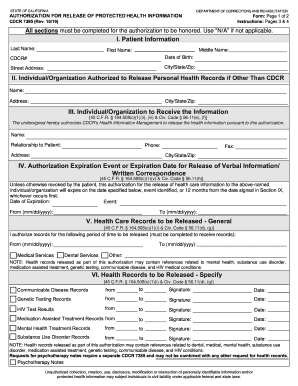
This guide provides step-by-step instructions for completing the CA CDCR 7385, the Authorization for Release of Protected Health Information form. Following these detailed instructions will help ensure that you accurately complete the form online.
Follow the steps to fill out the CA CDCR 7385 effectively.
- Use the ‘Get Form’ button to access the online version of the CA CDCR 7385 form and open it in the document editor.
- In Section I, input the patient information accurately: last name, middle name, first name, CDCR number, date of birth, and street address, including city, state, and ZIP code.
- Proceed to Section II to provide details about the individual or organization authorized to release personal health records, including their name and address.
- In Section III, fill in the name of the individual or organization that will receive the information along with their relationship to the patient and contact details, including phone, address, and fax if applicable.
- Section IV requires you to specify the expiration event or date for the authorization. Enter the date, event, or select a date range for how long you want the authorization to remain valid.
- In Section V, indicate the health care records to be released by entering the date range for medical and dental services. If there are other records, specify them accordingly.
- Section VI allows you to specify further details on particular health records to be released, such as communicable disease records, genetic testing records, and HIV test results. Ensure you provide corresponding date ranges and sign where required.
- Complete Section VII by checking at least one purpose for the release or use of the information. You may select 'Other' and further specify the reason.
- In Section VIII, review the authorization information. Ensure you understand the rights provided regarding the release of your health information.
- Finally, sign and date in Section IX, ensuring to include your printed name. If someone is signing on your behalf, they must also provide their information, authority to sign, and signature.
- After completing the form, you can save your changes, download a copy for your records, print it, or share it as needed.
Complete your CA CDCR 7385 form online today for a smooth processing experience.
Filling out a medical release form, such as the CA CDCR 7385, involves providing key information about yourself and the specific records you wish to release. You will need to include the names of the persons or entities that should receive the records and the purpose for the release. By following the instructions carefully, you ensure your request is processed efficiently.
Industry-leading security and compliance
US Legal Forms protects your data by complying with industry-specific security standards.
-
In businnes since 199725+ years providing professional legal documents.
-
Accredited businessGuarantees that a business meets BBB accreditation standards in the US and Canada.
-
Secured by BraintreeValidated Level 1 PCI DSS compliant payment gateway that accepts most major credit and debit card brands from across the globe.