Loading
Get Uk Sf100 2019-2025
How it works
-

Open form follow the instructions
-

Easily sign the form with your finger
-

Send filled & signed form or save
How to fill out the UK SF100 online
The UK SF100 is a crucial form for those seeking a Sure Start Maternity Grant, which provides financial assistance for new parents. This guide will help you navigate the online completion of the SF100, ensuring you submit a comprehensive and accurate application.
Follow the steps to successfully complete the UK SF100 online.
- Press the ‘Get Form’ button to access the online version of the UK SF100 and open it for editing.
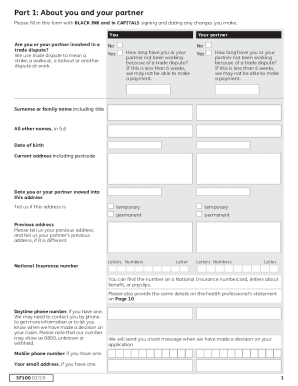
- Begin with 'Part 1: About you and your partner.' Fill in your details, such as name, date of birth, and current address. Make sure to indicate whether your address is permanent or temporary, and provide your National Insurance number.
- In 'Part 2: About benefits, entitlements and payments,' answer whether you or your partner receive any listed benefits. Include the names of any benefits you are currently receiving or awaiting a decision on.
- Proceed to 'Part 3: Expecting a baby.' Provide the expected date of childbirth and indicate if you expect multiple births.
- Complete 'Part 4: If the baby has already been born.' Enter the birth date of the baby and confirm if it was a multiple birth.
- In 'Part 5: About a baby already born that you have become responsible for,' fill in relevant details about the baby, including any legal guardianship or adoption information.
- Go to 'Part 6: About other children under 16 years of age in your household.' Indicate whether there are other children living with you and provide their details if applicable.
- Review 'Part 7: General information.' Answer whether a Sure Start Maternity Grant has already been paid for your baby, and indicate if you are receiving Child Benefit.
- Use 'Part 8: Other information' to provide any additional relevant information that may support your claim.
- In 'Part 9: How we pay you,' enter your bank account details for direct payment. Ensure accuracy to avoid delays in processing.
- Complete parts 10, 11, and 12 based on your situation, and then sign and date the declaration.
- Finally, review your completed form for any missing information or corrections, and then save your changes, download, print, or share the form as needed.
Start filling out the UK SF100 online to secure your maternity grant!
If you are pregnant and unemployed in the UK, you may be eligible for several benefits, such as Universal Credit or Maternity Allowance. You will need to prove your eligibility through various forms, including the MATB1 certificate. The UK SF100 provides guidance on how to navigate these benefits effectively.
Industry-leading security and compliance
US Legal Forms protects your data by complying with industry-specific security standards.
-
In businnes since 199725+ years providing professional legal documents.
-
Accredited businessGuarantees that a business meets BBB accreditation standards in the US and Canada.
-
Secured by BraintreeValidated Level 1 PCI DSS compliant payment gateway that accepts most major credit and debit card brands from across the globe.