Get Canada Sst-noa-gd-is 2019
How it works
-

Open form follow the instructions
-

Easily sign the form with your finger
-

Send filled & signed form or save
How to fill out the Canada SST-NOA-GD-IS online
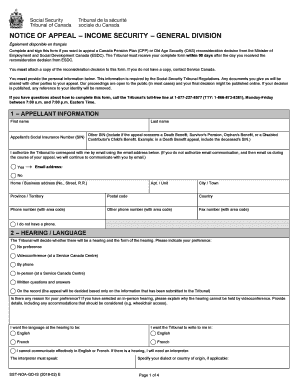
The Canada SST-NOA-GD-IS form is essential for individuals seeking to appeal a reconsideration decision related to the Canada Pension Plan or Old Age Security. This guide will provide you with a clear and supportive walkthrough on how to effectively fill out this online form, ensuring that you complete it accurately and submit it within the required timeframe.
Follow the steps to successfully complete the Canada SST-NOA-GD-IS form online.
- Press the ‘Get Form’ button to access the SST-NOA-GD-IS form and open it in your browser.
- Fill in the appellant information section. This includes your first name, last name, Social Insurance Number, and other relevant details. If the appeal concerns specific benefits, ensure to include the additional Social Insurance Number as required.
- Authorize the Tribunal to communicate with you via email by selecting 'Yes' and providing your email address, or select 'No' if you prefer other forms of communication.
- Complete the hearing preference section. Indicate whether you prefer a videoconference, phone hearing, in-person meeting, or written questions. Specify your language preference for the hearing and the preferred language for correspondence.
- Indicate the date you received the reconsideration decision. If you cannot recall the date, select the appropriate option provided.
- In the reasons for appeal section, clearly explain the disagreements you have with the reconsideration decision. Attach additional pages if needed to fully convey your points.
- In the supporting documents section, check 'Yes' if you are including supporting documents that bolster your appeal, or 'No' if you do not have any additional documents to provide.
- If your appeal is late, explain the reasons why it is being submitted after the deadline. Include the steps taken to show your intent to appeal.
- If applicable, provide details about your representative, including their contact information. Ensure your representative submits the authorization if you have chosen to have one.
- Both the appellant and representative (if any) must sign and date their respective declaration sections to confirm the truthfulness of the information provided.
- After completing the form, save your changes and choose to download, print, or share it as necessary.
Complete your Canada SST-NOA-GD-IS form online today and ensure your appeal is submitted on time.
Get form
NCL, or Non-Capital Loss, in Canadian tax refers to a loss that can potentially be used to offset taxable income in other years. Understanding NCL is crucial if you operate a business that reports losses, as it allows you to carry those losses forward or back to reduce tax liability. For more clarity on NCL and how it relates to your taxes, explore Canada SST-NOA-GD-IS. This can help you maximize your financial strategy.
Get This Form Now!
Industry-leading security and compliance
-
In businnes since 199725+ years providing professional legal documents.
-
Accredited businessGuarantees that a business meets BBB accreditation standards in the US and Canada.
-
Secured by BraintreeValidated Level 1 PCI DSS compliant payment gateway that accepts most major credit and debit card brands from across the globe.