Get Ca Edd De 9adj-i 2011
How it works
-

Open form follow the instructions
-

Easily sign the form with your finger
-

Send filled & signed form or save
How to fill out the CA EDD DE 9ADJ-I online
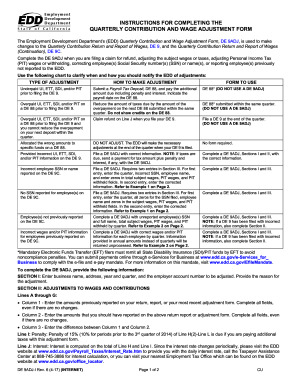
The California Employment Development Department's Quarterly Contribution and Wage Adjustment Form (DE 9ADJ) allows users to make necessary adjustments to their reported wages and contributions. This guide provides step-by-step instructions for accurately filling out the DE 9ADJ online, ensuring your adjustments are submitted correctly.
Follow the steps to complete the CA EDD DE 9ADJ-I online.
- Click 'Get Form' button to obtain the DE 9ADJ form and open it for filling out online.
- In Section I, enter your business name, address, year, quarter, and the employer account number that requires adjustment. Also, specify the reason for your adjustment.
- Proceed to Section II, where you will enter line items A through G. For each line, input the previously reported amounts in Column 1, the correct amounts you should report in Column 2, and the difference between these amounts in Column 3. Ensure all fields are completed, even if there are no changes.
- In Line I, if you are paying additional taxes with this adjustment form, calculate a penalty of ten percent (10%) of Line H and enter it.
- Calculate interest based on the amounts from Line H and Line I and enter this on Line J. Refer to the EDD website for the most current interest rate if needed.
- In Line K, account for any erroneous State Disability Insurance (SDI) deductions not refunded, noting that these must first be refunded to employees before claiming on the DE 9ADJ.
- On Line L, enter the total contributions and withholdings you have paid.
- Calculate the total on Line M by adding together the subtotal from Line H2, the penalty from Line I, the interest from Line J, and the erroneous SDI deductions from Line K, while subtracting the contributions and withholdings paid from Line L. If there is a balance due, make arrangements to pay this amount.
- If there are adjustments affecting the DE 9C, complete Section III. This section requires you to correct any previously reported information, ensuring that it reflects the quarter information accurately.
- Finally, have a preparer or responsible individual sign the form, providing their title, phone number, and the date. The request for refunds or credits will not be processed without a signature. Once complete, you can save changes, download, print, or share the form as necessary.
Complete your CA EDD DE 9ADJ-I online efficiently by following these steps.
Get form
To obtain a 10-digit EDD number, you typically need to register for unemployment insurance benefits through the California EDD website. Upon successful registration, you will receive your EDD number, which is vital for tracking your claims. If you encounter any difficulties during this process, the UsLegalForms platform offers comprehensive resources to assist you. Using these tools ensures that you receive your CA EDD DE 9ADJ-I number without unnecessary complications.
Get This Form Now!
Industry-leading security and compliance
-
In businnes since 199725+ years providing professional legal documents.
-
Accredited businessGuarantees that a business meets BBB accreditation standards in the US and Canada.
-
Secured by BraintreeValidated Level 1 PCI DSS compliant payment gateway that accepts most major credit and debit card brands from across the globe.