Loading
Form preview
  • US Legal Forms
  • Form Library
  • Labor Forms
  • California Labor Forms
  • Ca Si-report - Los Angeles County 2014

Get Ca Si-report - Los Angeles County 2014-2026

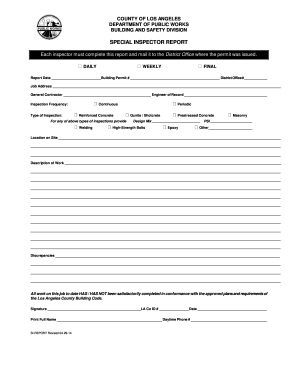
As issued.  DAILY  WEEKLY  FINAL Report Date _________________________Building Permit # _____________________________________________ District Office#_____________ Job Address ___________________________________________________________________________________________________________________ General Contractor ____________________________________________ Engineer of Record ___________________________________________  Continuous Inspection Frequency: Type of Inspection:  Rein.

How it works

  1. Open form

    Open form follow the instructions

  2. Easily sign form

    Easily sign the form with your finger

  3. Share form

    Send filled & signed form or save

How to fill out the CA SI-REPORT - Los Angeles County online

Navigating the CA SI-REPORT for Los Angeles County may seem daunting, but this guide will provide you with clear instructions to complete the form online effectively. By following these steps, you will ensure that all necessary information is submitted accurately and promptly.

Follow the steps to fill out the form online.

  1. Press the ‘Get Form’ button to access the CA SI-REPORT and open it in an online editor.
  2. Complete the report date and the associated building permit number, ensuring that both fields are filled out correctly.
  3. Provide the job address where the inspection takes place. Double-check its accuracy to avoid any processing issues.
  4. Input the name of the general contractor and the engineer of record associated with the project in the designated fields.
  5. Select the appropriate inspection frequency by checking either 'Daily', 'Weekly', or 'Final' based on your inspection schedule.
  6. Indicate the type of inspection by checking the relevant boxes such as 'Reinforced Concrete', 'Gunite / Shotcrete', or any other applicable type.
  7. If applicable, fill in the design mix details and PSI (pounds per square inch) for concrete work to provide specific information on the materials used.
  8. Describe the exact location on the job site where the inspection is being conducted to ensure clarity.
  9. Detail the nature of the work performed in the designated section, ensuring you provide enough context.
  10. Clearly note any discrepancies found during the inspection in the specified area to maintain thorough documentation.
  11. Complete the final section by indicating whether the work to date has been satisfactorily completed in conformance with the approved plans.
  12. Sign the report, providing your LA County ID number and the date of signing, along with your printed full name and daytime phone number.
  13. Finally, save your changes, download the completed report, print it for physical mailing, or share it as required.

Start your document preparation today by filling out the CA SI-REPORT online.

Get form

Experience a faster way to fill out and sign forms on the web. Access the most extensive library of templates available.
Get form

Related content

File Online
File online: bizfile Banner, Limited Liability Company, LLC Formation, LLC Statement of...
Learn more
California ISO: Home
Welcome to the California Independent System Operator (ISO). We manage the flow of...
Learn more
Volatile Organic Compounds in the Nation's Ground...
by JS Zogorski — Three-dimensional molecular configuration and composition of some of...
Learn more

Related links form

Bristol Water Meter Application Form Water Supply Connections - Severn Trent Water S101a Medical Underwriters At Aviva Form

Questions & Answers

Get answers to your most pressing questions about US Legal Forms API.

Contact support

To file a California corporate disclosure statement online, visit the California Secretary of State's website. There, you can find the relevant forms and provide the required details about your corporation. After filling out the necessary information, you can submit your disclosure statement electronically. For a seamless experience, explore the CA SI-REPORT - Los Angeles County solution on uslegalforms, which offers straightforward instructions and tips for online filing.

Yes, you can file the CA statement of Information online through the California Secretary of State's website. This online process is convenient and allows you to complete your filing efficiently from any location. Ensure that you have the necessary details ready, such as your business entity information. Using the CA SI-REPORT - Los Angeles County section on uslegalforms can make this process even easier and guide you through online filing.

Filing a statement of Information online in California is straightforward and efficient. Start by visiting the official California Secretary of State's website and navigate to the CA SI-REPORT - Los Angeles County section. You can complete the form and submit it electronically, saving time and effort. Using platforms like uslegalforms can simplify this process further by providing user-friendly templates and guidance.

In California, the statement of Information can be filed by any authorized person within the business entity, including owners and directors. The CA SI-REPORT - Los Angeles County requires designated individuals to ensure accurate representation and compliance. It is crucial that the person filing has access to the necessary business information. This helps maintain the integrity of your filings.

In California, you have 90 days from the date of your initial article filing to submit your first statement of Information. Additionally, for subsequent filings, you typically need to file by the end of your corporation's or LLC's anniversary month. The CA SI-REPORT - Los Angeles County helps you remember these timelines. Missing deadlines can result in penalties, so plan ahead.

In California, a statement of Information must be filed annually for LLCs and corporations. Specifically, the CA SI-REPORT - Los Angeles County requires this filing to ensure that your business remains compliant with state laws. Timely filing helps maintain active status and avoids penalties. Keep track of your due dates to stay ahead.

You can get a California entity ID by registering your business with the California Secretary of State. Once your registration is approved, you will be assigned an entity ID, which is essential for various business transactions. This ID is crucial for businesses operating in Los Angeles County, ensuring compliance with state regulations. USLegalForms can simplify the registration process, making it easier for you to obtain your entity ID.

No, a SOS entity number is not the same as an EIN (Employer Identification Number). The SOS entity number identifies your business at the state level, while an EIN is issued by the IRS for tax purposes. Both numbers serve different functions, and it's important to understand their roles in your business operations, especially in Los Angeles County. At USLegalForms, we can help clarify the differences and provide assistance in obtaining both numbers.

To get a copy of your California Statement of Information, you must request it from the California Secretary of State's office. You can do this online through their official website or by mail. Be prepared to provide your entity name or number to facilitate the request. USLegalForms provides guidance on how to complete this process smoothly, ensuring you access your documents without hassle.

To obtain a California Secretary of State entity number, you need to register your business with the Secretary of State's office. You can accomplish this by submitting the appropriate forms and fees online or by mail. After your application is processed, you will receive your entity number, which is crucial for managing your business. USLegalForms offers resources to help you gather the necessary documentation for this process.

Get This Form Now!

Use professional pre-built templates to fill in and sign documents online faster. Get access to thousands of forms.
Get form
If you believe that this page should be taken down, please follow our DMCA take down processhere.

Industry-leading security and compliance

US Legal Forms protects your data by complying with industry-specific security standards.
  • In businnes since 1997
    25+ years providing professional legal documents.
  • Accredited business
    Guarantees that a business meets BBB accreditation standards in the US and Canada.
  • Secured by Braintree
    Validated Level 1 PCI DSS compliant payment gateway that accepts most major credit and debit card brands from across the globe.
Get CA SI-REPORT - Los Angeles County
Get form
  • Adoption
  • Bankruptcy
  • Contractors
  • Divorce
  • Home Sales
  • Employment
  • Identity Theft
  • Incorporation
  • Landlord Tenant
  • Living Trust
  • Name Change
  • Personal Planning
  • Small Business
  • Wills & Estates
  • Packages A-Z
  • Affidavits
  • Bankruptcy
  • Bill of Sale
  • Corporate - LLC
  • Divorce
  • Employment
  • Identity Theft
  • Internet Technology
  • Landlord Tenant
  • Living Wills
  • Name Change
  • Power of Attorney
  • Real Estate
  • Small Estates
  • Wills
  • All Forms
  • Forms A-Z
  • Form Library
  • Legal Hub
  • About Us
  • Help Portal
  • Legal Resources
  • Blog
  • Affiliates
  • Contact Us
  • Delete My Account
  • Site Map
  • Industries
  • Forms in Spanish
  • Localized Forms
  • State-specific Forms
  • Forms Kit
  • Real Estate Handbook
  • All Guides
  • Notarize
  • Incorporation services
  • For Consumers
  • For Small Business
  • For Attorneys
  • USLegal
  • FormsPass
  • pdfFiller
  • signNow
  • altaFlow
  • DocHub
  • Instapage
Form Packages
  • Adoption
  • Bankruptcy
  • Contractors
  • Divorce
  • Home Sales
  • Employment
  • Identity Theft
  • Incorporation
  • Landlord Tenant
  • Living Trust
  • Name Change
  • Personal Planning
  • Small Business
  • Wills & Estates
  • Packages A-Z
Form Categories
  • Affidavits
  • Bankruptcy
  • Bill of Sale
  • Corporate - LLC
  • Divorce
  • Employment
  • Identity Theft
  • Internet Technology
  • Landlord Tenant
  • Living Wills
  • Name Change
  • Power of Attorney
  • Real Estate
  • Small Estates
  • Wills
  • All Forms
  • Forms A-Z
  • Form Library
Customer Service
  • Legal Hub
  • About Us
  • Help Portal
  • Legal Resources
  • Blog
  • Affiliates
  • Contact Us
  • Delete My Account
  • Site Map
  • Industries
  • Forms in Spanish
  • Localized Forms
  • State-specific Forms
  • Forms Kit
Legal Guides
  • Real Estate Handbook
  • All Guides
Prepared for you
  • Notarize
  • Incorporation services
Our Customers
  • For Consumers
  • For Small Business
  • For Attorneys
Our Sites
  • USLegal
  • FormsPass
  • pdfFiller
  • signNow
  • altaFlow
  • DocHub
  • Instapage
Social Media
Call us now toll free:
+1 833 426 79 33
As seen in:
© Copyright 1999-2026 airSlate Legal Forms, Inc. 3720 Flowood Dr, Flowood, Mississippi 39232
  • Your Privacy Choices
  • Terms of Service
  • Privacy Notice
  • Content Takedown Policy
  • Bug Bounty Program