Get Reporting & Control Hris Request Form - Working At Mcmaster - Workingatmcmaster
How it works
-

Open form follow the instructions
-

Easily sign the form with your finger
-

Send filled & signed form or save
How to use or fill out the Reporting & Control HRIS Request Form - Working At McMaster online
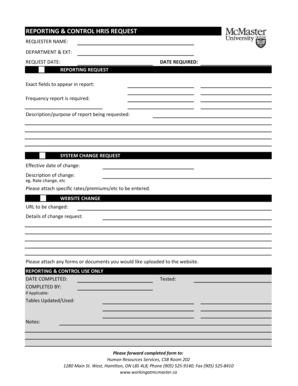
Filling out the Reporting & Control HRIS Request Form is essential for communicating specific reporting or change requests within McMaster. This guide will provide you with clear and detailed steps to ensure that the form is completed accurately and submitted correctly.
Follow the steps to successfully complete the HRIS Request Form.
- Click ‘Get Form’ button to obtain the form and open it in the editor.
- Begin by entering your name in the 'Requester Name' field to identify who is submitting the request.
- Fill in your department and extension in the 'Department & EXT' section to ensure proper routing of your request.
- Enter the 'Request Date' to document when the form is being completed.
- In the 'Reporting Request' section, specify the 'Date Required' for the report so that urgency can be assessed.
- Indicate the 'Exact fields to appear in report' to clarify what data is needed for your report.
- State the 'Frequency report is required' to ensure it aligns with your reporting needs.
- Provide a brief 'Description/purpose of report being requested' for context around your needs.
- If you are making a system change request, enter the 'Effective date of change' and describe the change clearly.
- Attach any specific rates, premiums, or other documents relevant to your request.
- For website changes, include the 'URL to be changed' and clearly outline the 'Details of change request'.
- Ensure to attach any necessary forms or documents that you wish to be uploaded to the website.
- Once you have completed all sections, review all entries for accuracy.
- Save your changes, and if necessary, download, print, or share the completed form.
- Finally, forward the completed form to the designated address provided in the form for processing.
Complete your Reporting & Control HRIS Request Form online today to ensure timely processing of your request.
You can contact the HR department at McMaster University via their main office number or email, both of which are available on the university's official website. They offer support on various topics, including employment inquiries, benefits, and HR policies. Utilizing the Reporting & Control HRIS Request Form - Working At McMaster - Workingatmcmaster is another effective way to streamline your HR-related questions.
Industry-leading security and compliance
-
In businnes since 199725+ years providing professional legal documents.
-
Accredited businessGuarantees that a business meets BBB accreditation standards in the US and Canada.
-
Secured by BraintreeValidated Level 1 PCI DSS compliant payment gateway that accepts most major credit and debit card brands from across the globe.