Loading
Get India Nsdl Annexure S6
How it works
-

Open form follow the instructions
-

Easily sign the form with your finger
-

Send filled & signed form or save
How to fill out the India NSDL Annexure S6 online
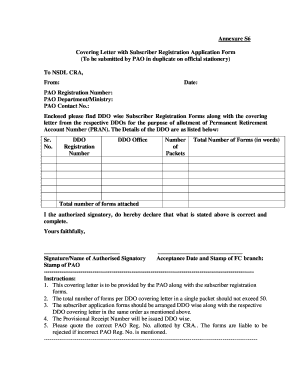
The India NSDL Annexure S6 is an essential form for the registration of subscribers seeking a Permanent Retirement Account Number (PRAN). This guide will provide you with step-by-step instructions to accurately complete the form online, ensuring compliance with the necessary requirements.
Follow the steps to complete the form with ease.
- Click ‘Get Form’ button to obtain the form and open it in the editor.
- Enter the date at the top of the form. Make sure to use the current date when submitting your application.
- Provide the PAO registration number accurately. This number is crucial for your application's identification and processing.
- Fill in the name of the PAO department or ministry, ensuring that it matches the official title.
- Include the contact number of the PAO for any follow-ups or inquiries regarding your application.
- List the details of the DDOs, including each DDO registration number and office location. Ensure that the data is organized and matches exactly with the corresponding subscriber registration forms.
- Specify the number of packets for each DDO and the total number of forms in words and numerals, ensuring accuracy.
- As the authorized signatory, provide your signature and name, confirming that the information is correct and complete.
- Include the acceptance date and stamp from the FC branch, followed by the stamp of the PAO.
- Review all sections for accuracy before saving changes. Once completed, you may download, print, or share the form as required.
Complete your documents online now to ensure timely processing.
What is the procedure for changing the POP / POP-SP? A subscriber can change the POP-SP by submission of form UoS-S5 to the POP-SP associated at present or to the new POP-SP. The subscriber may also decide to change his/her POP-SP in case of change of location.