Loading
Form preview
  • US Legal Forms
  • Other Templates
  • More Forms
  • More Multi-State Forms
  • Combined Insurance Claims Made Easy 2018

Get Combined Insurance Claims Made Easy 2018-2026

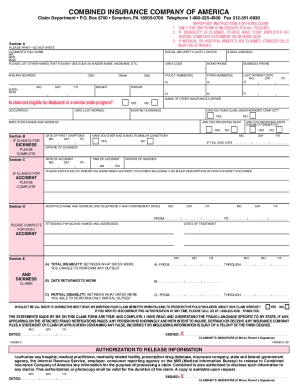
Claims Made Easy For faster claim payment* please submit your claim online at www.CombinedInsurance.com/ClaimsFILING A CLAIM BY MAIL 1.Download the claim form2. Print all six pages of the claim form 3.

How it works

  1. Open form

    Open form follow the instructions

  2. Easily sign form

    Easily sign the form with your finger

  3. Share form

    Send filled & signed form or save

How to use or fill out the Combined Insurance Claims Made Easy online

Filing an insurance claim can be challenging, but the Combined Insurance Claims Made Easy form is designed to streamline the process for users. This guide provides clear and supportive instructions to help you complete the form accurately and efficiently.

Follow the steps to fill out the Combined Insurance Claims Made Easy form

  1. Press the ‘Get Form’ button to access the Combined Insurance Claims Made Easy form and open it for editing.
  2. Begin by filling out Section A on the first page. Here, you will need to enter your full name, current mailing address, and relevant identification information, such as policy numbers and contact details. Make sure to include any previous names you may use for identification purposes.
  3. Complete either Section B or Section C based on whether your claim is for an accident or sickness. Provide detailed information about the event or condition, ensuring you describe the symptoms, diagnosis, or circumstances of your injury.
  4. In Sections D and E, provide additional details if you were hospitalized or had any disabilities. Include the name of the hospital, dates of admission and discharge, and the duration of total or partial disability if applicable.
  5. Make sure to sign and date the first page where indicated, as your signature is required for processing the claim.
  6. Have your attending physician complete the necessary sections on the second page, detailing diagnosis, treatment dates, and conditions. Their input is crucial for verifying your claim.
  7. If applicable, ensure your employer fills out the Employer's Statement, confirming your disability status and employment details.
  8. After completing the form, review it for accuracy. Ensure that all signatures are in place, particularly on the Fraud Notification page.
  9. Save your completed form, and consider making copies for your personal records. Then, you can download, print, or share the document as needed.

Complete your claims online to ensure faster processing and payment.

Get form

Experience a faster way to fill out and sign forms on the web. Access the most extensive library of templates available.
Get form

Related content

Just got engaged? Don't forget to talk about...
Talk about insurance needs, consider home insurance, and update life insurance...
Learn more
The Myth of the Liability Insurance Claims...
by DJ Nye · 1988 · Cited by 29 — Court decisions can affect estimates of both the...
Learn more
2016 Publication 575
Jan 4, 2017 — The distribution must be made directly from the plan to the insurance...
Learn more

Related links form

Description Of Topic(s) Nyhart Login Iu HSA Reimbursement Form - HealthEquity HSA Closure Request Form Mail Or Fax Completed Forms To: Address: HealthEquity, Attn: Client

Questions & Answers

Get answers to your most pressing questions about US Legal Forms API.

Contact support

The timeframe to file a claim with health insurance varies by policy but typically ranges from 30 days to one year after receiving service. It is essential to know the specific time limits defined in your policy, as delays could affect your eligibility for benefits. For your convenience, using platforms like UsLegalForms can simplify this process, making Combined Insurance Claims Made Easy a reality.

Yes, Combined Insurance is a legitimate company known for its comprehensive insurance products and reliable service. They have been in business for many years, providing customers with clear options and support. Reputable organizations often review their practices, which allows clients to trust their claims process. Moreover, Combined Insurance Claims Made Easy is their commitment to helping you with your insurance needs.

Yes, you can file separate claims for the same accident if you hold policies with different insurers. Just ensure that each claim reflects the coverage applicable to each policy. This can help you maximize your recovery for related expenses. For additional assistance, consider the resources available at UsLegalForms as you navigate the Combined Insurance Claims Made Easy process.

The waiting period to make a claim on your car insurance typically depends on your policy terms. Generally, you should be covered at the time of the accident, with many providers allowing you to file a claim immediately if you have active coverage. Check your specific policy to confirm the details. With Combined Insurance Claims Made Easy, they aim to clarify all aspects of your coverage for you.

Yes, you can file claims with both insurance companies if you have coverage under two policies. This is often referred to as dual coverage, and you may be eligible to receive benefits from both. However, the total reimbursement you receive may not exceed your actual expenses. Utilizing resources like UsLegalForms can help you understand your rights and the claims process, making Combined Insurance Claims Made Easy.

Combined Insurance typically covers a range of expenses incurred due to an accident, including medical bills and disability payments. These benefits can ease your financial burden during a challenging time. It's crucial to review your specific policy for complete details on coverage limits. Ultimately, Combined Insurance Claims Made Easy aims to provide clarity and support during such events.

To make a claim with Combined Insurance, you should start by gathering all relevant information related to your policy and the incident. Visit the Combined Insurance website or contact their customer service for specific instructions. They provide a straightforward process, allowing you to submit claims online or via phone. Remember, Combined Insurance Claims Made Easy emphasizes a user-friendly approach, ensuring you feel supported throughout the claim process.

When speaking to an insurance claim adjuster, avoid making definitive statements that could jeopardize your claim, such as admitting fault or making unverified statements about your situation. Instead, focus on providing clear, factual information. Always remember, being prepared with accurate documentation from USLegalForms makes Combined Insurance claims made easy and protects your interests.

You can make a payment to Combined Insurance online through their secure payment portal, or you can call their customer service for assistance. Additionally, consider setting up automatic payments to ensure you never miss a due date. With USLegalForms, you can find resources and templates to help you stay organized, making Combined Insurance claims made easy.

To speed up your insurance claim, submit all required documentation promptly and keep communication open with your claims adjuster. Follow up regularly and provide any additional information they request without delay. By using USLegalForms, you can ensure that your paperwork is complete, making Combined Insurance claims made easy and efficient.

Get This Form Now!

Use professional pre-built templates to fill in and sign documents online faster. Get access to thousands of forms.
Get form
If you believe that this page should be taken down, please follow our DMCA take down processhere.
Get Combined Insurance Claims Made Easy
Get form
  • Adoption
  • Bankruptcy
  • Contractors
  • Divorce
  • Home Sales
  • Employment
  • Identity Theft
  • Incorporation
  • Landlord Tenant
  • Living Trust
  • Name Change
  • Personal Planning
  • Small Business
  • Wills & Estates
  • Packages A-Z
  • Affidavits
  • Bankruptcy
  • Bill of Sale
  • Corporate - LLC
  • Divorce
  • Employment
  • Identity Theft
  • Internet Technology
  • Landlord Tenant
  • Living Wills
  • Name Change
  • Power of Attorney
  • Real Estate
  • Small Estates
  • Wills
  • All Forms
  • Forms A-Z
  • Other Templates
  • Legal Hub
  • About Us
  • Help Portal
  • Legal Resources
  • Blog
  • Affiliates
  • Contact Us
  • Delete My Account
  • Site Map
  • Industries
  • Forms in Spanish
  • Localized Forms
  • State-specific Forms
  • Forms Kit
  • Real Estate Handbook
  • All Guides
  • Notarize
  • Incorporation services
  • For Consumers
  • For Small Business
  • For Attorneys
  • USLegal
  • FormsPass
  • pdfFiller
  • signNow
  • altaFlow
  • DocHub
  • Instapage
Form Packages
  • Adoption
  • Bankruptcy
  • Contractors
  • Divorce
  • Home Sales
  • Employment
  • Identity Theft
  • Incorporation
  • Landlord Tenant
  • Living Trust
  • Name Change
  • Personal Planning
  • Small Business
  • Wills & Estates
  • Packages A-Z
Form Categories
  • Affidavits
  • Bankruptcy
  • Bill of Sale
  • Corporate - LLC
  • Divorce
  • Employment
  • Identity Theft
  • Internet Technology
  • Landlord Tenant
  • Living Wills
  • Name Change
  • Power of Attorney
  • Real Estate
  • Small Estates
  • Wills
  • All Forms
  • Forms A-Z
  • Other Templates
Customer Service
  • Legal Hub
  • About Us
  • Help Portal
  • Legal Resources
  • Blog
  • Affiliates
  • Contact Us
  • Delete My Account
  • Site Map
  • Industries
  • Forms in Spanish
  • Localized Forms
  • State-specific Forms
  • Forms Kit
Legal Guides
  • Real Estate Handbook
  • All Guides
Prepared for you
  • Notarize
  • Incorporation services
Our Customers
  • For Consumers
  • For Small Business
  • For Attorneys
Our Sites
  • USLegal
  • FormsPass
  • pdfFiller
  • signNow
  • altaFlow
  • DocHub
  • Instapage
Social Media
Call us now toll free:
+1 833 426 79 33
As seen in:
© Copyright 1999-2026 airSlate Legal Forms, Inc. 17 Station Street, Ste. 203, Brookline, MA 02445
  • Your Privacy Choices
  • Terms of Service
  • Privacy Notice
  • Content Takedown Policy
  • Bug Bounty Program