Loading
Get Canada Visa Expert 2020-2025
How it works
-

Open form follow the instructions
-

Easily sign the form with your finger
-

Send filled & signed form or save
How to fill out the Canada Visa Expert online
Filling out the Canada Visa Expert Supplementary Immigration Assessment Form can be a straightforward process with the right guidance. This guide will walk you through each section and field of the form to ensure that you complete it accurately and efficiently.
Follow the steps to successfully complete your form
- Press the ‘Get Form’ button to access the form and open it in your digital platform.
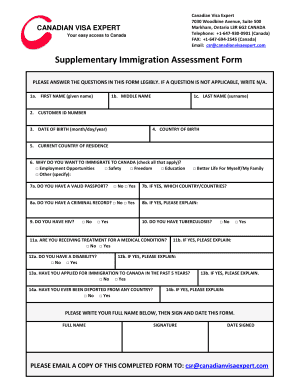
- Begin by providing your personal information. Enter your first name in the '1a. First Name' field, followed by your middle name in '1b. Middle Name', and your last name in '1c. Last Name'.
- Next, input your Customer ID Number in field '2'. This number helps to track your application.
- In '3. Date of Birth', enter your birth date in the specified format (month/day/year).
- Fill in the '4. Country of Birth' with the name of the country where you were born.
- In '5. Current Country of Residence', specify the country you currently reside in.
- For '6. Why do you want to immigrate to Canada?', check all applicable options. Options include Employment Opportunities, Safety, Freedom, Education, and Other. If you select 'Other,' please specify your reason.
- Proceed to '7a. Do you have a valid passport?' and select either 'Yes' or 'No'. If 'Yes', continue to '7b' and list the country or countries of your passport.
- In '8a. Do you have a criminal record?', choose 'Yes' or 'No'. If 'Yes', elaborate in '8b'.
- Answer '9. Do you have HIV?' and '10. Do you have tuberculosis?', selecting 'Yes' or 'No' for each.
- For '11a. Are you receiving treatment for a medical condition?', select your answer and provide details in '11b' if applicable.
- In '12a. Do you have a disability?', choose 'Yes' or 'No'. If 'Yes', please explain in '12b'.
- Answer '13a. Have you applied for immigration to Canada in the past 5 years?' and provide details if you respond 'Yes' in '13b'.
- For '14a. Have you ever been deported from any country?', answer accordingly and explain in '14b' if necessary.
- Finally, write your full name in the designated area, sign the form, and date it. Make sure your signature is clear.
- After completing the form, save your changes, and you have the option to download, print, or share the form. Don't forget to email a copy of the completed form to the address provided.
Complete your forms online today to ensure your immigration process moves forward smoothly.
To contact a visa officer in Canada, you can visit the official website of the Government of Canada. There, you will find specific contact details for visa officers. It is often best to use their online contact form to ask your questions. This method ensures that your inquiry goes directly to a qualified Canada Visa Expert who can provide the most accurate assistance.
Industry-leading security and compliance
US Legal Forms protects your data by complying with industry-specific security standards.
-
In businnes since 199725+ years providing professional legal documents.
-
Accredited businessGuarantees that a business meets BBB accreditation standards in the US and Canada.
-
Secured by BraintreeValidated Level 1 PCI DSS compliant payment gateway that accepts most major credit and debit card brands from across the globe.