Loading
Get Tsb Online Kerala Gov In
How it works
-

Open form follow the instructions
-

Easily sign the form with your finger
-

Send filled & signed form or save
How to fill out the Tsb Online Kerala Gov In online
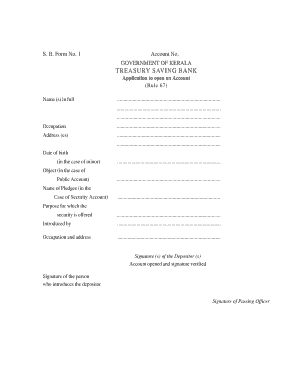
This guide provides comprehensive instructions for completing the Tsb Online Kerala Gov In, specifically focusing on the application to open a Treasury Saving Bank account. By following these steps, users will navigate the form effectively and efficiently.
Follow the steps to complete your application smoothly.
- Press the ‘Get Form’ button to access the application form and open it in your preferred editor.
- Fill in the account number field, ensuring that you provide your existing account details accurately.
- Enter your full name in the designated space, ensuring proper spelling and clarity.
- Indicate your occupation clearly to provide context about your professional status.
- Provide your complete address, including street, city, and postal code.
- If you are a minor, enter the date of birth in the specified format.
- For public accounts, state the object of the application succinctly.
- In the case of a security account, fill in the name of the pledgee in the appropriate section.
- Clearly state the purpose for which the security is being offered.
- Introduce yourself by listing the name of the individual who is introducing your application.
- Provide the occupation and address of the person introducing you.
- Sign the form in the signature section where it asks for your signature as the depositor.
- If applicable, ensure that the signature of the person introducing the depositor is included.
- A passing officer will need to sign the form to verify your details.
- Complete the declaration section, ensuring that all statements reflect your true circumstances.
- If necessary, indicate the station and date at the bottom of the form.
- Finalize your application by saving changes, and if needed, download, print, or share the form.
Begin your application process online today and take the first step towards opening your account.
Logging into TSB online banking is straightforward. Visit the TSB Online Kerala Gov In site, and enter your username and password in the designated fields. After entering your credentials, click on the login button to access your online banking dashboard.
Industry-leading security and compliance
US Legal Forms protects your data by complying with industry-specific security standards.
-
In businnes since 199725+ years providing professional legal documents.
-
Accredited businessGuarantees that a business meets BBB accreditation standards in the US and Canada.
-
Secured by BraintreeValidated Level 1 PCI DSS compliant payment gateway that accepts most major credit and debit card brands from across the globe.