Loading
Get Ca Civ-020 2016-2026
How it works
-

Open form follow the instructions
-

Easily sign the form with your finger
-

Send filled & signed form or save
How to fill out the CA CIV-020 online
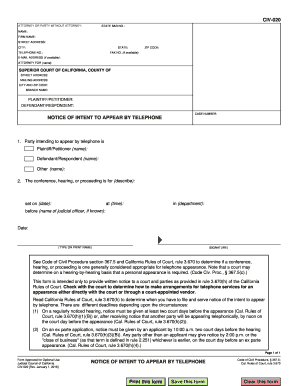
The CA CIV-020 form is essential for notifying the court of your intent to appear by telephone. This guide will walk you through each section of the form, ensuring you have a clear understanding of how to fill it out correctly and efficiently.
Follow the steps to complete the CA CIV-020 form online.
- Press the ‘Get Form’ button to obtain the CA CIV-020 and open it for online editing.
- In the first section, fill in your attorney or party details, including your name, firm name, State Bar number, street address, city, state, telephone number, and email address if available.
- Identify the party you are representing by checking the corresponding box for 'Plaintiff/Petitioner,' 'Defendant/Respondent,' or 'Other.' Provide the name of the person you are representing.
- Write a brief description of the conference, hearing, or proceeding in the designated section. Include pertinent details such as the date and time it is scheduled.
- Indicate which department the hearing will take place in and the name of the judicial officer if known.
- Sign and date the form. Ensure the signature is legible, and type or print your name under the signature line.
- Review all completed fields for accuracy before submitting.
- Upon final review, you can save changes, print, or share the filled form as necessary.
Complete your CA CIV-020 form online today to ensure your timely appearance by telephone.
To answer a summons without an attorney in California, you need to carefully read the documents and understand your obligations. Create a written response that addresses each allegation in the summons. Ensure that you file your response with the court and send a copy to the plaintiff, adhering to the timelines set forth in the CA CIV-020.