Loading
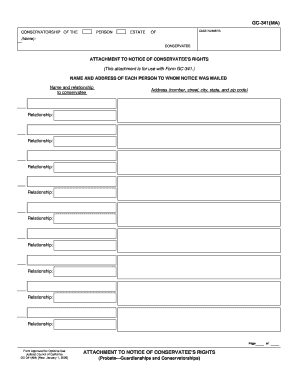
Get Ca Gc-341(ma) 2008-2026
How it works
-

Open form follow the instructions
-

Easily sign the form with your finger
-

Send filled & signed form or save
How to fill out the CA GC-341(MA) online
The CA GC-341(MA) is an important document used in conservatorship cases to notify relevant parties of the conservatee's rights. This guide provides step-by-step instructions on how to accurately complete this form online.
Follow the steps to complete the CA GC-341(MA) form online.
- Press the ‘Get Form’ button to access the form and open it in your preferred online editor.
- Begin by entering the case number at the top of the form to ensure it is properly associated with your case.
- Input the name of the conservatee in the designated section to clearly identify who the rights notice pertains to.
- Provide your name and relationship to the conservatee in the 'Name and relationship to conservatee' area. List all individuals to whom notice was mailed along with their corresponding addresses.
- Continue filling in each person's name, relationship, and address as necessary, ensuring all fields are complete and accurate.
- Review the completed form for any errors or missing information to prevent issues during processing.
- Once you are satisfied with the information entered, utilize the options to save changes, download, print, or share the completed form as needed.
- To protect your information after finalizing the form, be sure to press the 'Clear This Form' button to remove your data from the display.
Start filling out your documents online today for a smoother process.
The main purpose of a conservatorship is to provide support and protection for individuals who cannot manage their personal or financial affairs. This legal arrangement ensures that a responsible individual can make decisions that are in the best interest of the conservatee. By implementing CA GC-341(MA) in this process, families can create a structured environment that prioritizes care while respecting the dignity of the individual involved.