Loading
Get Ca Sv-100 2018
How it works
-

Open form follow the instructions
-

Easily sign the form with your finger
-

Send filled & signed form or save
How to fill out the CA SV-100 online
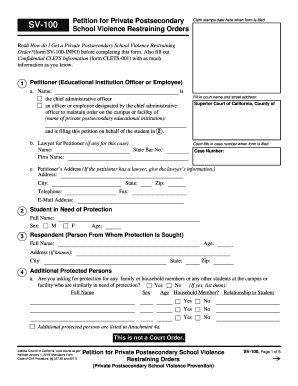
Filling out the CA SV-100 form online is essential for educational institutions seeking a private postsecondary school violence restraining order. This guide provides step-by-step instructions designed to help users navigate the process efficiently and effectively.
Follow the steps to complete your CA SV-100 form online.
- Click ‘Get Form’ button to obtain the form and access it in the online editor.
- Begin by entering the name of the educational institution and the title of the petitioner, who can be either the chief administrative officer or a designated officer or employee, in the designated fields.
- Fill in the court name and street address where the petition will be filed. Ensure that 'Superior Court of California, County of' is documented accurately.
- Provide the lawyer's information if applicable, including their name, State Bar number, and firm name.
- Input the petitioner’s address, including city, state, zip code, telephone number, and fax, along with the email address. If a lawyer is involved, their information should be provided instead.
- Document the full name, sex, and age of the student needing protection in the appropriate fields.
- Enter the full name, age, and known address of the respondent from whom protection is being sought.
- Indicate whether you are requesting protection for additional persons by selecting 'Yes' or 'No' and listing their names and details in the specified fields.
- Describe the relationship between the student and the respondent. Provide any additional explanations if needed.
- Check the applicable reasons for filing in the specified county based on the respondent's location and actions.
- If there are any prior court cases involving the respondent, check 'Yes' and provide details of each case.
- Complete the section describing the respondent's conduct, detailing specific incidents and any harm caused.
- Select the conduct orders you wish to request from the court, outlining prohibitions against the respondent.
- If seeking a stay-away order, indicate the required distance and locations where the respondent must remain away from.
- Provide information regarding any firearms or ammunition the respondent may possess.
- Request a Temporary Restraining Order if necessary and state if the respondent has been notified about the court petition.
- Fill out any requests regarding the service of orders, fees for filing, and court costs.
- Review all entries for accuracy, then save your changes, download, print, or share the completed form as needed.
Complete your CA SV-100 form online today to ensure the safety of individuals on your campus.
Get form
Experience a faster way to fill out and sign forms on the web. Access the most extensive library of templates available.
Related links form
To file a California corporate disclosure statement online, visit the California Secretary of State's website and navigate to the Business Programs section. Here, you will find the online filing options available for your CA SV-100. Additionally, US Legal Forms can assist you in preparing the necessary documents to ensure that your filing is complete and accurate.
Get This Form Now!
Use professional pre-built templates to fill in and sign documents online faster. Get access to thousands of forms.