Loading
Get Co Jdf 78 2014-2026
How it works
-

Open form follow the instructions
-

Easily sign the form with your finger
-

Send filled & signed form or save
How to fill out the CO JDF 78 online
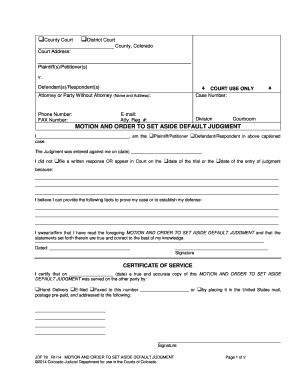
Filling out the CO JDF 78 form online can seem overwhelming, but with careful guidance, you can complete it efficiently. This form is crucial for individuals seeking to set aside a default judgment in Colorado, and knowing how to navigate it will be beneficial to your case.
Follow the steps to fill out the CO JDF 78 successfully.
- Click ‘Get Form’ button to obtain the form and open it in your preferred online editor.
- Begin by filling in the court information at the top of the form. Indicate the type of court (County or District Court) and include the relevant county name and court address.
- Enter the details of the parties involved in the case. Identify the Plaintiff(s)/Petitioner(s) and Defendant(s)/Respondent(s) clearly, ensuring that accurate names are entered.
- Provide the name and address of your attorney or indicate that you are a party without an attorney. Fill in the corresponding contact information such as phone number, fax number, and email address.
- In the section labeled 'MOTION AND ORDER TO SET ASIDE DEFAULT JUDGMENT,' fill in your name and indicate whether you are the Plaintiff/Petitioner or Defendant/Respondent. Include the date when the judgment was entered against you.
- Next, specify the reason for not filing a written response or appearing in court. Clearly explain your situation in the space provided.
- Outline any facts you believe can support your case or establish your defense. Use the designated space to provide detailed information.
- Affirm the truthfulness of your statements by signing and dating the form in the provided area.
- Complete the 'CERTIFICATE OF SERVICE' section by entering the date you served a copy of the motion. Indicate the method of delivery used to provide the other party with a copy.
- Conclude by filling in the court's order section if applicable, and again provide the necessary signature and date. Ensure that all sections are completed accurately.
- Once you have filled out the form, you can save your changes, download a copy, print it, or share it as needed.
Complete the CO JDF 78 online today to take the next step in your legal process.
Reversing a default judgment can be difficult, depending on the circumstances surrounding the case. It often requires demonstrating valid reasons for missing the initial proceedings or showcasing new evidence. Utilizing CO JDF 78 can guide you through the required steps. Consulting with a legal expert may also improve your chances of reversing the judgment.