Loading
Form preview
  • US Legal Forms
  • Form Library
  • Legal Forms
  • Connecticut Legal Forms
  • Ct Jd-cv-54 2013

Get Ct Jd-cv-54 2013-2026

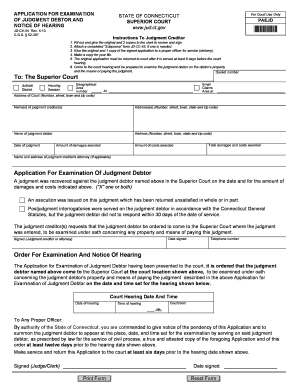
Tructions To Judgment Creditor 1. Fill out and give the original and 2 copies to the clerk to review and sign. 2. Attach a completed "Subpoena" form JD-CL-43, if one is needed. 3. Give the original and 1 copy of the signed application to a proper officer for service (delivery). 4. Make a copy for your file. 5. The original application must be returned to court after it is served at least 6 days before the court hearing. 6. Come to the court hearing and be prepared to examine the judgment debtor.

How it works

  1. Open form

    Open form follow the instructions

  2. Easily sign form

    Easily sign the form with your finger

  3. Share form

    Send filled & signed form or save

How to fill out the CT JD-CV-54 online

This guide provides step-by-step instructions on completing the CT JD-CV-54 Application for Examination of Judgment Debtor online. Whether you are a judgment creditor seeking to assess a debtor's financial situation or simply navigating the legal process, this guide will assist you in effectively using the form.

Follow the steps to complete the form accurately.

  1. Select the ‘Get Form’ button to obtain the document and open it in the editor.
  2. Fill in the 'Docket number' field accurately with the relevant case number assigned by the court.
  3. Enter the 'Address of Court' using the complete address, including number, street, town, and zip code.
  4. Specify the 'Judicial District' and any applicable 'Housing Session' or 'Small Claims Area'.
  5. Provide the names and addresses of all judgment creditors in the designated sections.
  6. Fill in the name and address of the judgment debtor, ensuring all information is correct.
  7. Record the 'Date of judgment' and the amounts for 'Damages awarded', 'Costs awarded', and the 'Total damages and costs awarded'.
  8. If applicable, include the name and address of the judgment creditor's attorney.
  9. In the application section, check the boxes for the reasons prompting the examination request.
  10. Date the application, and secure the signature of the judgment creditor or their attorney, along with their telephone number.
  11. Complete the 'Court Hearing Date and Time' by entering the relevant hearing details including courtroom and time.
  12. Once the form is filled out, review all entries for accuracy. You can then save your changes, download, print, or share the form as needed.

Get started now by completing the CT JD-CV-54 form online.

Get form

Experience a faster way to fill out and sign forms on the web. Access the most extensive library of templates available.
Get form

Related content

CV054CO.pdf - Connecticut Judicial Branch - CT.gov
1. Fill out and give the original and 2 copies to the clerk to review and sign. 2. Attach...
Learn more
Case 3:20-cv-05151-JD Document 54 Filed 11/23/21...
Apr 21, 2022 — The final rule also prohibits any “may be” labeling, despite the...
Learn more
Renal Cell Carcinoma - Cloudfront.net
EPIDEMIOLOGY, AETIOLOGY AND PATHOLOGY. 11. 3.1. Epidemiology. 11. 3.2. Aetiology. 11...
Learn more

Related links form

CA DC016 2018 MD DL-043A 2024 GSA Standard Form 94 2020 Essex County College Immunization Form 2013

Questions & Answers

Get answers to your most pressing questions about US Legal Forms API.

Contact support

In Connecticut, the time limit to file a lawsuit, known as the statute of limitations, varies depending on the nature of your claim. For most personal injury cases, you generally have two years from the date of the incident to file. However, for contract disputes, this period can be up to six years. Make sure to review available resources like CT JD-CV-54 and seek guidance through platforms like UsLegalForms to ensure you meet all deadlines.

In Connecticut, a motion to dismiss can be filed for several reasons, including lack of jurisdiction, failure to state a claim, or if the case is barred by law. These grounds help ensure that only valid cases proceed through the court system. If you find yourself needing to file a motion, consulting with legal forms, such as the CT JD-CV-54, can help clarify your compliance with procedural requirements. UsLegalForms can assist you in preparing the necessary documents.

To file for workers' compensation in Connecticut, you must first report your injury to your employer as soon as possible. Next, fill out the necessary forms, including the CT JD-CV-54 if necessary. It’s crucial to understand your rights and the deadlines involved, as timely submission can significantly impact your claim. UsLegalForms offers various resources to help you navigate this process smoothly.

Taking someone to small claims court can be beneficial if you have a valid claim and can present solid evidence. The process is often faster and less expensive than traditional court proceedings. However, you should weigh the potential outcomes and costs of filing forms like CT JD-CV-54 against the amount you wish to recover. Consider using resources like UsLegalForms to streamline your claim process effectively.

That's why most small claims cases are local. However, sometimes you may need to file a small claims lawsuit against a defendant who lives in another state. ... If that person never comes to the state, you may not be able to sue them in small claims court.

Small claims court is designed to be a way for people to recover money in cases that are too small to be worth going through regular litigation, which can be costly and time-consuming. There's not a minimum amount you can sue for in small claims court, but most courts have a filing fee that will be between $25 and $50.

Try to settle the dispute outside of court. ... Contact the county clerk in the small claims court district closest to the residence or business of the person you are suing. ... Fill out a complaint form, otherwise known as a "Statement of Claim" at the clerk's office, and pay the filing fee.

Only an individual can sue in Small Claims Court. Corporations, partnerships, associations, or assignees cannot sue in Small Claims Court. However, they can be sued in Small Claims Court. If you are a corporation, partnership, association or assignee, you can bring a Commercial Claim or Consumer Transaction.

If you are younger than 18, your parent or guardian may file the claim for you. Corporations, partnerships, association or assignees cannot sue in Small Claims Court, but they can be sued. If you sue in Small Claims Court, you are the claimant (plaintiff); if you have been sued, you are the defendant.

Generally, claims involving a relatively small amount of money (up to $10,000 depending on the state) should be filed in small claims court. A separate court will hear cases involving medium-sized claims (usually up to $25,000) and another court will hear most claims that exceed that amount.

Get This Form Now!

Use professional pre-built templates to fill in and sign documents online faster. Get access to thousands of forms.
Get form
If you believe that this page should be taken down, please follow our DMCA take down processhere.

Industry-leading security and compliance

US Legal Forms protects your data by complying with industry-specific security standards.
  • In businnes since 1997
    25+ years providing professional legal documents.
  • Accredited business
    Guarantees that a business meets BBB accreditation standards in the US and Canada.
  • Secured by Braintree
    Validated Level 1 PCI DSS compliant payment gateway that accepts most major credit and debit card brands from across the globe.
Get CT JD-CV-54
Get form
Form Packages
Adoption
Bankruptcy
Contractors
Divorce
Home Sales
Employment
Identity Theft
Incorporation
Landlord Tenant
Living Trust
Name Change
Personal Planning
Small Business
Wills & Estates
Packages A-Z
Form Categories
Affidavits
Bankruptcy
Bill of Sale
Corporate - LLC
Divorce
Employment
Identity Theft
Internet Technology
Landlord Tenant
Living Wills
Name Change
Power of Attorney
Real Estate
Small Estates
Wills
All Forms
Forms A-Z
Form Library
Customer Service
Your Privacy Choices
Terms of Service
Privacy Notice
Legal Hub
Content Takedown Policy
Bug Bounty Program
About Us
Help Portal
Legal Resources
Blog
Affiliates
Contact Us
Delete My Account
Site Map
Industries
Forms in Spanish
Localized Forms
State-specific Forms
Forms Kit
Legal Guides
Real Estate Handbook
All Guides
Prepared for You
Notarize
Incorporation services
Our Customers
For Consumers
For Small Business
For Attorneys
Our Sites
US Legal Forms
USLegal
FormsPass
pdfFiller
signNow
altaFlow
DocHub
Instapage
Social Media
Call us now toll free:
+1 833 426 79 33
As seen in:
  • USA Today logo picture
  • CBC News logo picture
  • LA Times logo picture
  • The Washington Post logo picture
  • AP logo picture
  • Forbes logo picture
© Copyright 1997-2026
airSlate Legal Forms, Inc.
3720 Flowood Dr, Flowood, Mississippi 39232
Form Packages
Adoption
Bankruptcy
Contractors
Divorce
Home Sales
Employment
Identity Theft
Incorporation
Landlord Tenant
Living Trust
Name Change
Personal Planning
Small Business
Wills & Estates
Packages A-Z
Form Categories
Affidavits
Bankruptcy
Bill of Sale
Corporate - LLC
Divorce
Employment
Identity Theft
Internet Technology
Landlord Tenant
Living Wills
Name Change
Power of Attorney
Real Estate
Small Estates
Wills
All Forms
Forms A-Z
Form Library
Customer Service
Your Privacy Choices
Terms of Service
Privacy Notice
Legal Hub
Content Takedown Policy
Bug Bounty Program
About Us
Help Portal
Legal Resources
Blog
Affiliates
Contact Us
Delete My Account
Site Map
Industries
Forms in Spanish
Localized Forms
State-specific Forms
Forms Kit
Legal Guides
Real Estate Handbook
All Guides
Prepared for You
Notarize
Incorporation services
Our Customers
For Consumers
For Small Business
For Attorneys
Our Sites
US Legal Forms
USLegal
FormsPass
pdfFiller
signNow
altaFlow
DocHub
Instapage
Social Media
Call us now toll free:
+1 833 426 79 33
As seen in:
  • USA Today logo picture
  • CBC News logo picture
  • LA Times logo picture
  • The Washington Post logo picture
  • AP logo picture
  • Forbes logo picture
© Copyright 1997-2026
airSlate Legal Forms, Inc.
3720 Flowood Dr, Flowood, Mississippi 39232