Get Ct Jd-cv-69 1998-2026
How it works
-

Open form follow the instructions
-

Easily sign the form with your finger
-

Send filled & signed form or save
How to fill out the CT JD-CV-69 online
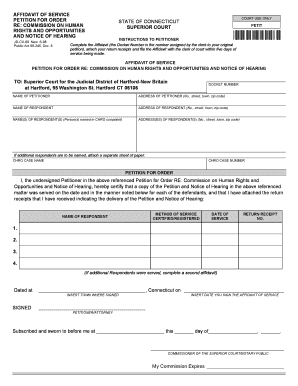
The CT JD-CV-69 form is essential for filing an affidavit of service related to a petition for an order with the Commission on Human Rights and Opportunities in Connecticut. This guide will assist you in understanding each component of the form and provide clear instructions for completing it online.
Follow the steps to complete the CT JD-CV-69 online effectively.
- Press the ‘Get Form’ button to access the CT JD-CV-69 form and open it in your digital editor.
- In the section labeled 'Docket Number,' enter the number assigned by the clerk to your original petition.
- Fill in your full name in the 'Name of Petitioner' field.
- Provide your complete address, including the number, street, town, and zip code, in the 'Address of Petitioner' field.
- Enter the name of the respondent in the 'Name of Respondent' field.
- Include the complete address of the respondent in the 'Address of Respondent' field.
- List the names of all respondents named in the CHRO complaint in the 'Name(s) of Respondent(s)' section.
- Provide the addresses of these respondents in the 'Address(es) of Respondent(s)' section.
- If you have more respondents, attach a separate sheet of paper with their information.
- In the 'CHRO Case Name' field, specify the name associated with your CHRO case.
- Fill in the 'CHRO Case Number' that pertains to your case.
- Choose the method of service used (certified/registered) for each respondent.
- For each respondent, enter their name, the date of service, and the return receipt number.
- If you served additional respondents, ensure you complete a second affidavit.
- Sign and date the form where indicated, ensuring you include the town and the date you sign.
- Have the affidavit subscribed and sworn before a Commissioner of the Superior Court or Notary Public.
- Once all information is complete and verified, save your changes, download, print, or share the document as needed.
Complete and submit your CT JD-CV-69 form online today for efficient processing.
Filing a complaint with the insurance commissioner in Connecticut is a straightforward process. Start by visiting the Connecticut Insurance Department's website, where you can find detailed instructions and access to the complaint form. Make sure to gather any necessary documentation related to your issue. If you need further assistance, using resources like CT JD-CV-69 can help streamline your filing process.
Industry-leading security and compliance
-
In businnes since 199725+ years providing professional legal documents.
-
Accredited businessGuarantees that a business meets BBB accreditation standards in the US and Canada.
-
Secured by BraintreeValidated Level 1 PCI DSS compliant payment gateway that accepts most major credit and debit card brands from across the globe.