Loading
Form preview
  • US Legal Forms
  • Other Templates
  • Legal Forms
  • Ohio Legal Forms
  • Oh Form 21.1 2000

Get Oh Form 21.1 2000-2026

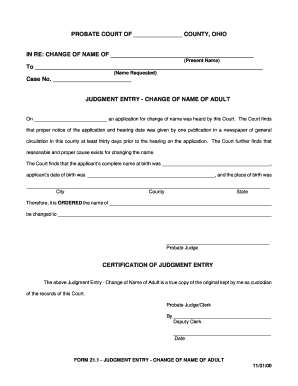
PROBATE COURT OF COUNTY, OHIOIN RE: CHANGE OF NAME OF (Present Name)To (Name Requested)Case No. JUDGMENT ENTRY CHANGE OF NAME OF ADULT On an application for change of name was heard by this Court.

How it works

  1. Open form

    Open form follow the instructions

  2. Easily sign form

    Easily sign the form with your finger

  3. Share form

    Send filled & signed form or save

How to fill out the OH Form 21.1 online

Filling out the OH Form 21.1 online can seem daunting, but this guide provides clear, step-by-step instructions to assist you in completing the change of name application smoothly. Whether you are familiar with online forms or not, these instructions are tailored to meet your needs.

Follow the steps to complete the online form efficiently.

  1. Press the ‘Get Form’ button to obtain the OH Form 21.1, allowing you to access the document in an online editor.
  2. In the first section, provide the present name of the person requesting the name change. Ensure that this is accurate and matches legal identification documents.
  3. Next, fill in the name requested for change. This should be the new name the applicant wishes to adopt.
  4. Enter the case number assigned to this application. If you do not have one, it may be left blank, or you may need to obtain one before submitting.
  5. In the judgment entry section, input the date when the application was heard. This is typically the date of your scheduled hearing.
  6. Complete the applicant's full name at birth. This is essential for legal records, so ensure it is entered as per official documents.
  7. Provide the date of birth of the applicant to accurately confirm their identity.
  8. Fill in the place of birth, including city, county, and state, to uphold comprehensive identification details.
  9. Once all sections are filled out, review the information for accuracy. Correct any errors if necessary.
  10. Finally, save your changes. Depending on your requirements, you may choose to download, print, or share the completed form.

Start filling out your documents online using the guidance provided.

Get form

Experience a faster way to fill out and sign forms on the web. Access the most extensive library of templates available.
Get form

Related content

SCO-CLC-PBT 21.1 - Judgment Entry (Change of Name...
FORM 21.1 - JUDGMENT ENTRY - CHANGE OF NAME OF ADULT. Amended: January 1, 2023. Discard...
Learn more
Advisory 21.1 Occupational Health & Safety...
Apr 13, 2018 — Advisory 21.1. Occupational Health & Safety ... Send a copy of the...
Learn more
Eaton Corporation End User License Agreement for...
This End User License Agreement (the “Agreement”) is a legal agreement between you and...
Learn more

Related links form

Gretchen Colon Physician Order For Incontinence Supplies Hot Bricks IN RE:q Marriage Q Civil Union Q Legal Separation Q Allocation Of Parental Responsibilities

Questions & Answers

Get answers to your most pressing questions about US Legal Forms API.

Contact support

To legally change your name in Ohio after marriage, you typically need your marriage certificate as proof. You can then update your name on various documents, such as your Social Security card, driver's license, and bank accounts. While this process does not directly relate to OH Form 21.1, having the right paperwork is essential, and platforms like US Legal Forms provide handy templates and information for each step to ensure compliance with legal standards.

Filing probate in Ohio without a lawyer is possible if you take the right steps. Begin by gathering all necessary documents, including the will, death certificate, and any inventories of the estate. You can find the required forms online, including the petition for probate, and file them at the local probate court. While using OH Form 21.1 might simplify your process if the estate qualifies as small, be sure to familiarize yourself with Ohio's probate laws to navigate the process effectively.

Yes, Ohio provides a small estate affidavit, commonly referred to as OH Form 21.1. This affidavit allows individuals to claim assets of a deceased person's estate that meets specific criteria without going to probate court. By filling this form, you can simplify the administration of smaller estates, ensuring a smoother transition of assets to the rightful heirs. If you need assistance, platforms like US Legal Forms offer essential guidance and access to these forms.

Yes, you can settle an estate without probate in Ohio by utilizing a small estate affidavit, specifically OH Form 21.1. This simplified process is available for estates valued under $100,000, which lets heirs bypass the lengthy probate court procedures. Instead of waiting for a court to validate the estate, this method enables quicker access to assets. If you're navigating this process, consider using reliable resources, like US Legal Forms, to obtain the necessary documents.

In Ohio, the amount for a small estate affidavit varies depending on the value of the estate. Generally, if the total value of the estate is less than $100,000, you can use the small estate affidavit, also known as OH Form 21.1, to settle the estate without going through probate. This form streamlines the process, allowing beneficiaries to access assets more quickly and efficiently. You can find specific guidelines online that outline the documentation needed to support your small estate claim.

The duration to change your name in Ohio can vary based on several factors. Generally, the process may take anywhere from a few weeks to a couple of months. After submitting the OH Form 21.1, the court will schedule a hearing, and the time for notice publication can add extra weeks. To expedite the process, make sure to have all necessary documents ready and follow all required steps closely.

To change your name in Stark County, you must complete the OH Form 21.1 and submit it to the Stark County Probate Court. Along with your application, you will need to provide identification and other relevant documents. After filing your request, you will likely need to publish a notice in a local newspaper and attend a court hearing to finalize the name change.

When changing your name, you typically need to provide proof of identity and residency. This may include a government-issued photo ID, such as a driver's license, and a current utility bill, lease, or bank statement. Additionally, if you are changing your name due to marriage or divorce, you will need to provide the appropriate documents as well.

To get your name legally changed in Ohio, you must complete a series of steps. First, you will need to fill out the OH Form 21.1 and file it with the court in your county. After that, you should publish a notice of your name change in a local newspaper. Finally, attend your court hearing where the judge will approve your request.

In Ohio, an executor generally has six months to file probate after a person's death. However, it is advisable to complete this process sooner to ensure timely management of the estate. The OH Form 21.1 can help streamline the filing process, making it easier for you to fulfill your responsibilities as an executor.

Get This Form Now!

Use professional pre-built templates to fill in and sign documents online faster. Get access to thousands of forms.
Get form
If you believe that this page should be taken down, please follow our DMCA take down processhere.
Get OH Form 21.1
Get form
  • Adoption
  • Bankruptcy
  • Contractors
  • Divorce
  • Home Sales
  • Employment
  • Identity Theft
  • Incorporation
  • Landlord Tenant
  • Living Trust
  • Name Change
  • Personal Planning
  • Small Business
  • Wills & Estates
  • Packages A-Z
  • Affidavits
  • Bankruptcy
  • Bill of Sale
  • Corporate - LLC
  • Divorce
  • Employment
  • Identity Theft
  • Internet Technology
  • Landlord Tenant
  • Living Wills
  • Name Change
  • Power of Attorney
  • Real Estate
  • Small Estates
  • Wills
  • All Forms
  • Forms A-Z
  • Other Templates
  • Legal Hub
  • About Us
  • Help Portal
  • Legal Resources
  • Blog
  • Affiliates
  • Contact Us
  • Delete My Account
  • Site Map
  • Industries
  • Forms in Spanish
  • Localized Forms
  • State-specific Forms
  • Forms Kit
  • Real Estate Handbook
  • All Guides
  • Notarize
  • Incorporation services
  • For Consumers
  • For Small Business
  • For Attorneys
  • USLegal
  • FormsPass
  • pdfFiller
  • signNow
  • altaFlow
  • DocHub
  • Instapage
Form Packages
  • Adoption
  • Bankruptcy
  • Contractors
  • Divorce
  • Home Sales
  • Employment
  • Identity Theft
  • Incorporation
  • Landlord Tenant
  • Living Trust
  • Name Change
  • Personal Planning
  • Small Business
  • Wills & Estates
  • Packages A-Z
Form Categories
  • Affidavits
  • Bankruptcy
  • Bill of Sale
  • Corporate - LLC
  • Divorce
  • Employment
  • Identity Theft
  • Internet Technology
  • Landlord Tenant
  • Living Wills
  • Name Change
  • Power of Attorney
  • Real Estate
  • Small Estates
  • Wills
  • All Forms
  • Forms A-Z
  • Other Templates
Customer Service
  • Legal Hub
  • About Us
  • Help Portal
  • Legal Resources
  • Blog
  • Affiliates
  • Contact Us
  • Delete My Account
  • Site Map
  • Industries
  • Forms in Spanish
  • Localized Forms
  • State-specific Forms
  • Forms Kit
Legal Guides
  • Real Estate Handbook
  • All Guides
Prepared for you
  • Notarize
  • Incorporation services
Our Customers
  • For Consumers
  • For Small Business
  • For Attorneys
Our Sites
  • USLegal
  • FormsPass
  • pdfFiller
  • signNow
  • altaFlow
  • DocHub
  • Instapage
Social Media
Call us now toll free:
+1 833 426 79 33
As seen in:
© Copyright 1999-2026 airSlate Legal Forms, Inc. 17 Station Street, Suite 303, Brookline, MA 02445
  • Your Privacy Choices
  • Terms of Service
  • Privacy Notice
  • Content Takedown Policy
  • Bug Bounty Program